
- Property insurance claim documents checklist works best when you treat it like a clear evidence pack, not a random pile of attachments.
- The fastest way to reduce “missing item” loops is simple file hygiene: consistent names, small batches, and saved proof of every submission.
- If anything feels unclear, default to one habit that keeps you safe: ask for requirements in writing, and ask for receipt confirmation in writing.
Why I built this checklist around one problem: documents that “disappear”
I work on the operations side of claims. Not the legal side, not policy interpretation, not negotiation. The part I live in is the day-to-day reality of documentation: what comes in, how it gets logged, what gets routed to the right place, and what stalls because the file is unclear.
If you have ever heard “we don’t have that document” after you swear you already sent it, you know the kind of frustration I’m talking about. And here’s the thing: most of the time, that message does not mean anyone is lying. It usually means your document arrived without context, got saved under a useless filename, or landed in a queue that didn’t match your claim reference. Then, weeks later, the system still shows “missing item” and you get pulled into re-sending the same pieces again.
This page is a universal property insurance claim documents checklist, but it’s not just a list. It’s a way to package your documents so they are easier to confirm, easier to find, and harder to lose. No insurer-specific forms. No legal guidance. No promises. Just practical documentation habits that reduce back-and-forth in many common situations.
Key Point: “Having the document” is not the same as “the claim file can find the document.” Your job is to make it searchable, confirmable, and tied to your claim reference every time you send it.
The foundation: build one claim folder that stays clean under stress
When people tell me “I sent everything,” I believe them. The problem is that “everything” is often scattered: photos in one phone album, receipts in email, notes in a message thread, and a few screenshots somewhere in downloads. That setup works until you need to resend one specific item quickly, or you’re asked a simple question like “Which date did you submit the inventory list?”
So before we talk about documents, we talk about one simple system. It’s boring, but it saves real time. Create one claim folder (cloud, laptop, phone, any place you can reliably access) and keep it stable. If your system changes every week, you will lose track. The goal is not perfect organization. The goal is repeatable organization.
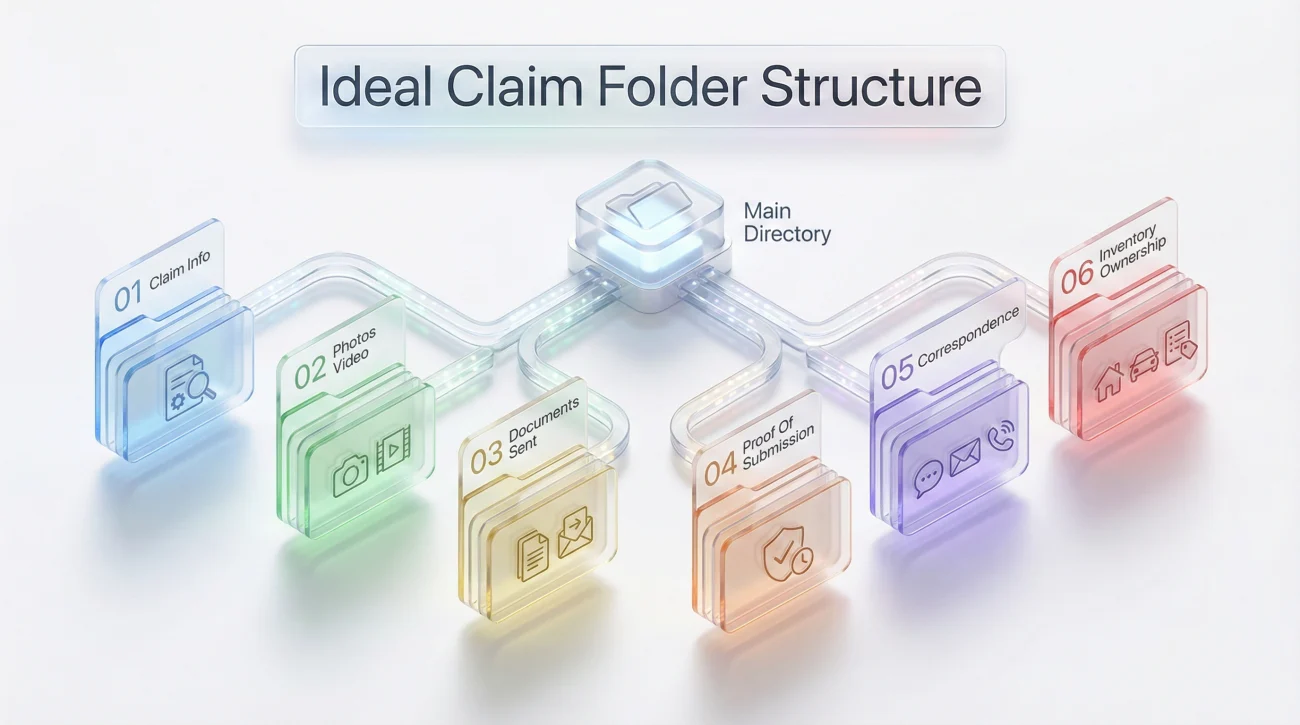
A folder layout that doesn’t collapse later
Here’s a structure I’ve seen work for people who are busy, stressed, and not trying to become an admin expert overnight. Use it as-is or tweak it, but do not over-engineer it.
- 📁 01-Claim-Info (claim reference, contact list, your running log)
- 📁 02-Photos-Video (damage visuals, grouped by area)
- 📁 03-Documents-Sent (final copies of what you submitted)
- 📁 04-Proof-Of-Submission (screenshots, sent-email PDFs, upload receipts)
- 📁 05-Correspondence (emails, letters, call notes)
- 📁 06-Inventory-Ownership (item list, receipts, ownership proof)
💡 Pro Tip: Keep “Documents-Sent” boring and clean. If something is a draft, it does not belong there. That single rule prevents accidental wrong-version attachments.
File naming: the quiet skill that stops confusion
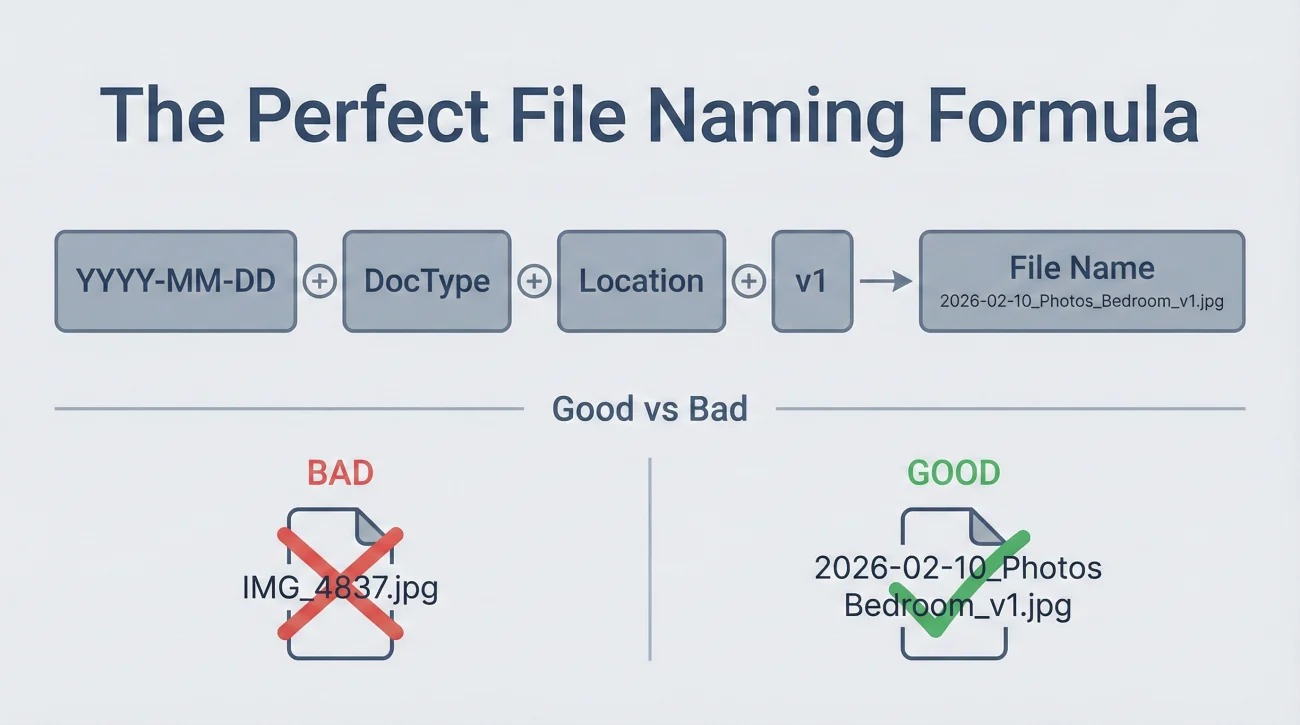
In a claim file, filenames matter more than people expect. “IMG_4837” tells nobody anything. “scan_002” is even worse. A reviewer is often working through dozens of files and looking for specific proof. If your filenames don’t say what they are, your documents become harder to confirm.
A simple naming pattern that works:
YYYY-MM-DD + DocType + LocationOrTopic + v1
Examples:
- 📄 2026-02-10_Claim-Summary_Contact-Incident_v1.pdf
- 📷 2026-02-10_Photos_Bedroom-Ceiling_Wide_v1.pdf
- 🧾 2026-02-11_Receipt_Water-Extractor-Rental_v1.pdf
- 🧾 2026-02-12_Inventory_Damaged-Items_v1.xlsx
- 📧 2026-02-12_Email_Batch2-Submission_v1.pdf
⚠️ Warning: If you rename nothing, you increase the chance your documents are treated like loose images instead of claim evidence. Rename first, then send.
The master checklist: documents grouped by what they prove
Most checklists fail because they mix everything together. You end up with a 30-item list that feels impossible, and you still don’t know what matters first. In operations, we look at documents by purpose: what does this item prove, and what decision does it support?
Use the table below as your navigation. It helps you prioritize what to attach early and what to keep ready for later requests.
| Document group | What it proves | Common examples | Usually send |
|---|---|---|---|
| Claim identity | Who you are and how to match your file | Claim reference, contact details, address or location | Early |
| Incident snapshot | What happened and initial condition | Photos, video walkthrough, short description | Early |
| Timeline trail | When you did what, and when you submitted what | Running log, call notes, submission timestamps | Keep updated |
| Mitigation and actions | Steps taken to reduce further damage | Photos before and after, vendor notes, relevant receipts | When requested or when relevant |
| Inventory and ownership | What items were affected and that they were yours | Item list, receipts, relevant payment proof, photos of items in use | Structured pack, not in the first message unless asked |
| Communication proof | What was asked, what you provided, what was confirmed | Emails, letters, upload receipts, screenshots of portal confirmations | Always save, submit selectively |
Group 1: Claim identity and a one-page summary
This is the simplest win. A short summary document makes your submissions easier to route and easier to confirm. I’ve watched claim files get messy because someone had to guess which attachments belonged to which claim reference. You don’t want your documents floating around without a label.
Include:
- ✅ Your name and best contact method
- ✅ Claim reference number (if you already have it)
- ✅ Address or location of incident
- ✅ Incident date (or best estimate if you do not know exact time)
- ✅ One paragraph describing what happened in plain language
Key Point: The claim summary is not for drama or persuasion. It is for matching, routing, and reducing confusion.
Group 2: Photos and video that tell a clear story
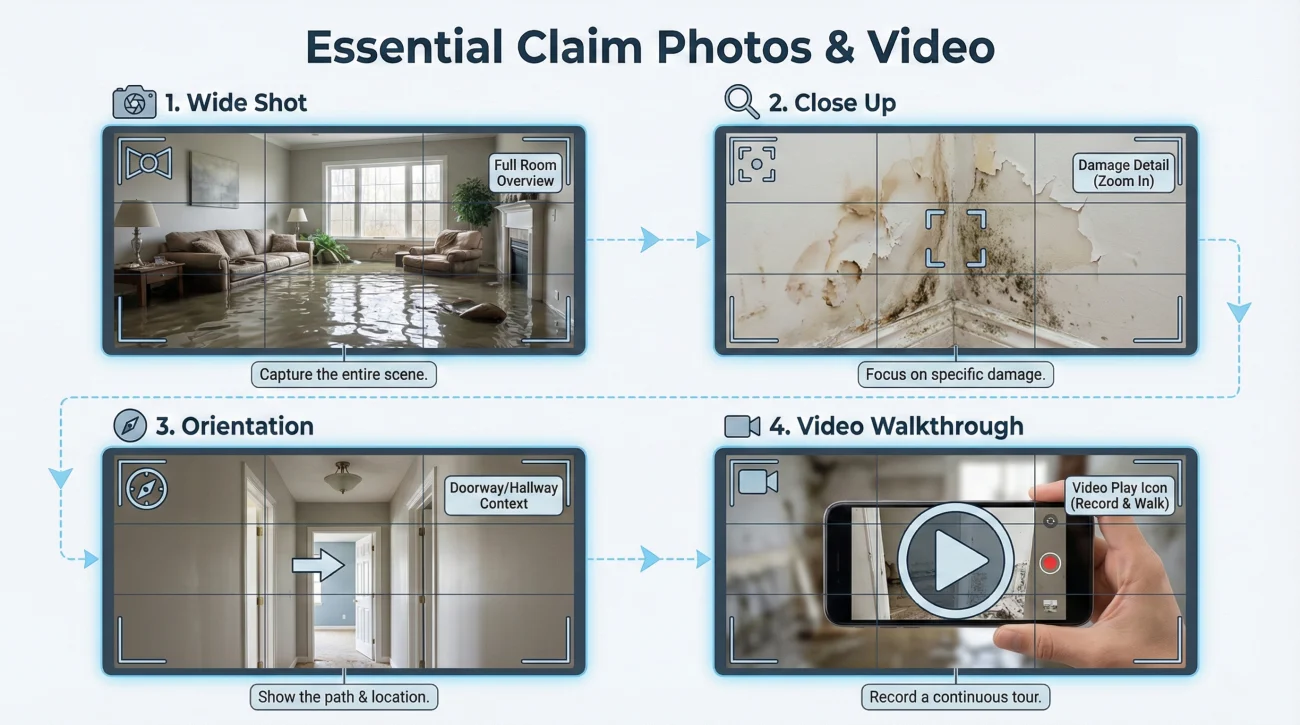
People often send photos that are technically “evidence” but operationally unhelpful. A dozen close-ups with no context creates a guessing game. If the reviewer can’t tell which room it is, which direction they’re looking, or how big the problem is, your photos become slower to process.
Think in sets:
- 📷 Wide shots that show the whole area
- 🔍 Close-ups that show the specific issue clearly
- 🧭 One “orientation” shot (doorway, hallway, exterior landmark) so location makes sense
- 🎥 A slow walkthrough video (short is fine, clarity beats length)
“Here are the photos.”
“Batch 1 includes 3 wide shots of the affected room, 6 close-ups, and one walkthrough video. Files are labeled by date and room.”
Group 3: Timeline log, the most underrated document
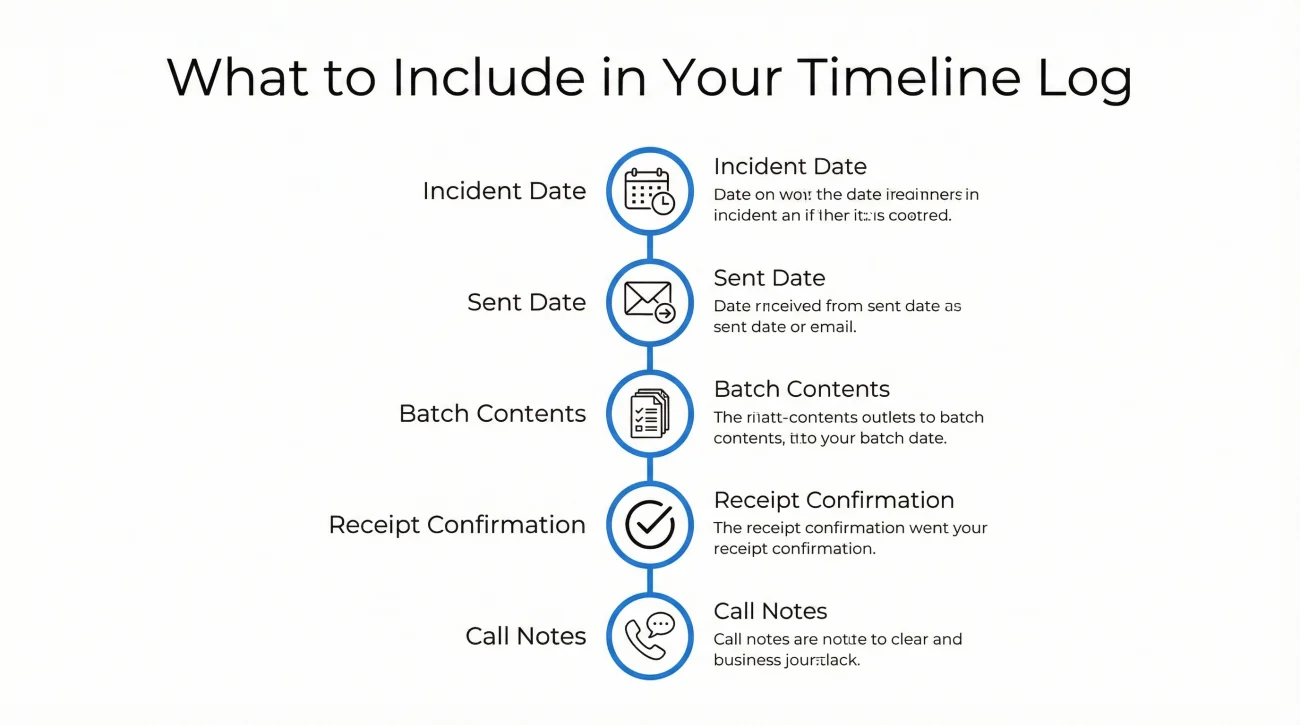
Let me say this gently: memory is not a system. When a claim stretches over weeks, people forget what they submitted and when. Then follow-ups turn into vague back-and-forth. A simple timeline log keeps you calm and keeps your messages factual.
Your log can be a note on your phone. Keep it short. Just record:
- 🗓️ Date you reported the incident
- 📨 Date you sent each document batch
- 🧾 What files were included (or batch name)
- ✅ Any receipt confirmation you received
- ☎️ Any call notes in two lines (who, what was agreed)
💡 Pro Tip: When you follow up, quote your own timeline log. It instantly makes your request easier to answer.
Attach versus keep ready: how to avoid oversharing and still stay prepared
One of the most common mistakes I see is the “kitchen sink email”: a massive submission with everything attached because the person is afraid of missing something. I understand why it happens. But operationally, it can slow you down because someone now has to sort a pile of mixed relevance.
A better approach is to send what establishes the situation and creates a clear claim identity, then keep the deeper support organized and ready so you can respond quickly when asked.
What you can usually send early without regret
- ✅ One-page claim summary
- ✅ A small, labeled photo set (wide and close-up)
- ✅ A short walkthrough video if it adds clarity
- ✅ Your timeline log (even if it is just a v1 draft)
What to keep ready until requested
This is the category that often takes time to assemble. Keeping it ready does not mean withholding. It means you are building a clean pack so you can send it in a readable way when needed.
- 📦 Detailed inventory list (room-by-room or category-by-category)
- 🧾 Ownership support (receipts, relevant payment proof, manuals, product labels)
- 📄 Vendor notes or service documentation (if you have it)
- 🖼️ “Before” photos that show items in the space (if you have them)
❌ Note: More documents is not always better. Better documents are better. A smaller, organized packet often moves faster than a flood of random proof.
A real-world pattern I see in stuck claims
Here’s a pattern that shows up a lot in operations. Someone submits photos and a few messages, then goes quiet because they assume the next steps are automatic. Later they receive a “missing documents” notice, but it’s vague. They send a bunch of attachments again. The file becomes messy. Everyone gets annoyed.
The fix is not complicated. It’s just written clarity. The moment you sense uncertainty, ask for the list in writing and ask for receipt confirmation in writing. You are not escalating. You are documenting.
Hello,
I want to make sure I’m sending the right items in the right order.
Could you please send me the required documents list in writing, and confirm which items you have already received from my last submission?
Thank you.
[Your name] | [Claim reference number]
Packaging: the batch system that reduces “we don’t have that” loops
If you’ve been pulled into re-sending documents, you already know the trap: you send a file, later you’re told it’s missing, then you resend and hope it sticks. A batch system breaks that cycle because it creates a clear index, a clear timestamp, and a clear “receipt” target.
Batch rules that work in many situations
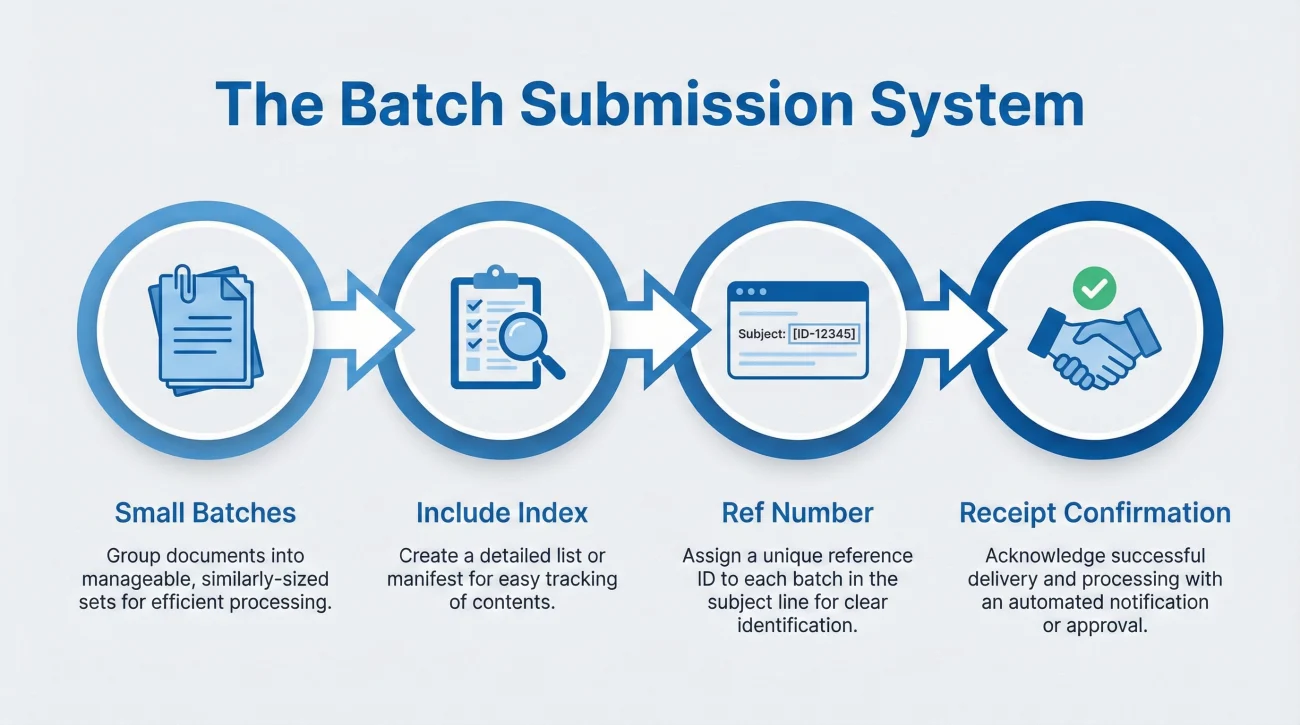
- 📦 Keep batches small (think 5 to 12 files, not 40)
- 🧾 Include an index in the message body listing filenames
- 🏷️ Put the claim reference in subject lines and in the first line of the message
- ✅ Ask for receipt confirmation that matches your index
That last point matters. If your index lists six files, the best receipt confirmation is “Received items 1 through 6.” It is specific and easy to prove later.
What a batch index looks like
Batch 1 Index (6 files)
1) 2026-02-10_Claim-Summary_Contact-Incident_v1.pdf
2) 2026-02-10_Photos_Affected-Area_Wide_v1.pdf
3) 2026-02-10_Photos_Affected-Area_Closeups_v1.pdf
4) 2026-02-10_Video_Walkthrough_v1.mp4
5) 2026-02-10_Timeline_Log_v1.pdf
6) 2026-02-10_Contact-List_v1.pdf
A calm email that sets expectations without sounding robotic
Subject: Claim documents submission (Batch 1) + request for written requirements
Hello,
I’m submitting Batch 1 today. For easy tracking, the file index is included below.
Could you please confirm which items from this batch were received, and send the remaining required documents list in writing so I can prepare the next batch correctly?
Thank you,
[Your name]
[Claim reference number]
💡 Pro Tip: If you submit through a portal, paste the same batch index into the portal notes field if it exists. If not, save it in your timeline log and keep a screenshot of the upload confirmation.
Proof of submission: the folder that saves people from repeating themselves
I’ve watched smart, organized people lose hours simply because they couldn’t prove what they sent. They knew they sent it. They could describe the day, the mood, the situation. But they didn’t have a receipt artifact. So the claim file treated it as missing and the cycle continued.
This is why I always recommend a dedicated “Proof-Of-Submission” folder. Every time you send anything, you save proof immediately. Not later. Not when you remember. Immediately.
What counts as proof (by channel)
| Submission method | Proof to save | What to look for |
|---|---|---|
| Saved “sent” email as PDF or message file | Date and time, recipients, subject line, attachment list if visible | |
| Portal upload | Screenshot of confirmation page | Timestamp, claim reference, and ideally filenames |
| Mobile app | Screenshot of successful upload state | Any confirmation text and the date |
| Shipping receipt + tracking + copy of what you sent | Ship date and delivery confirmation |
A short log format that keeps follow-ups easy
Your log does not need to be fancy. Keep it simple enough that you actually maintain it.
| Date | Action | Batch or item | Proof saved | Next step |
|---|---|---|---|---|
| 2026-02-10 | Submitted documents | Batch 1 (6 files) | Sent email PDF | Wait for written requirements list |
| 2026-02-12 | Follow-up | Status request | Sent email PDF | Confirm which items were received |
“I’m following up on Batch 2 sent on [date]. Could you confirm which files from the batch index were received?”
Ownership and inventory: how to stay believable without turning your claim into a scrapbook
This is where people get stuck. They hear “proof of ownership” and immediately assume it means a perfect receipt for every item. Real life is not like that. People move, emails get deleted, purchases happen over years, and not everything has a neat invoice attached.
From an operations perspective, what helps is not perfection. It’s consistency and clarity. If you build an inventory list that is readable and support it with reasonable proof where available, you make it easier to review. If you dump hundreds of unlabelled screenshots, you create a sorting problem.
How to structure an inventory list so it’s easy to understand
Keep it simple and standardized. You want each row to answer: what is it, where was it, and what proof exists.
| Area | Item | Identifier | Approx. age | Support available |
|---|---|---|---|---|
| Main room | Television | Model / serial if known | About 2 years | Photo in room + manual PDF |
| Kitchen | Small appliance | Brand + model if known | About 1 year | Receipt screenshot |
Proof alternatives that are still “clean”
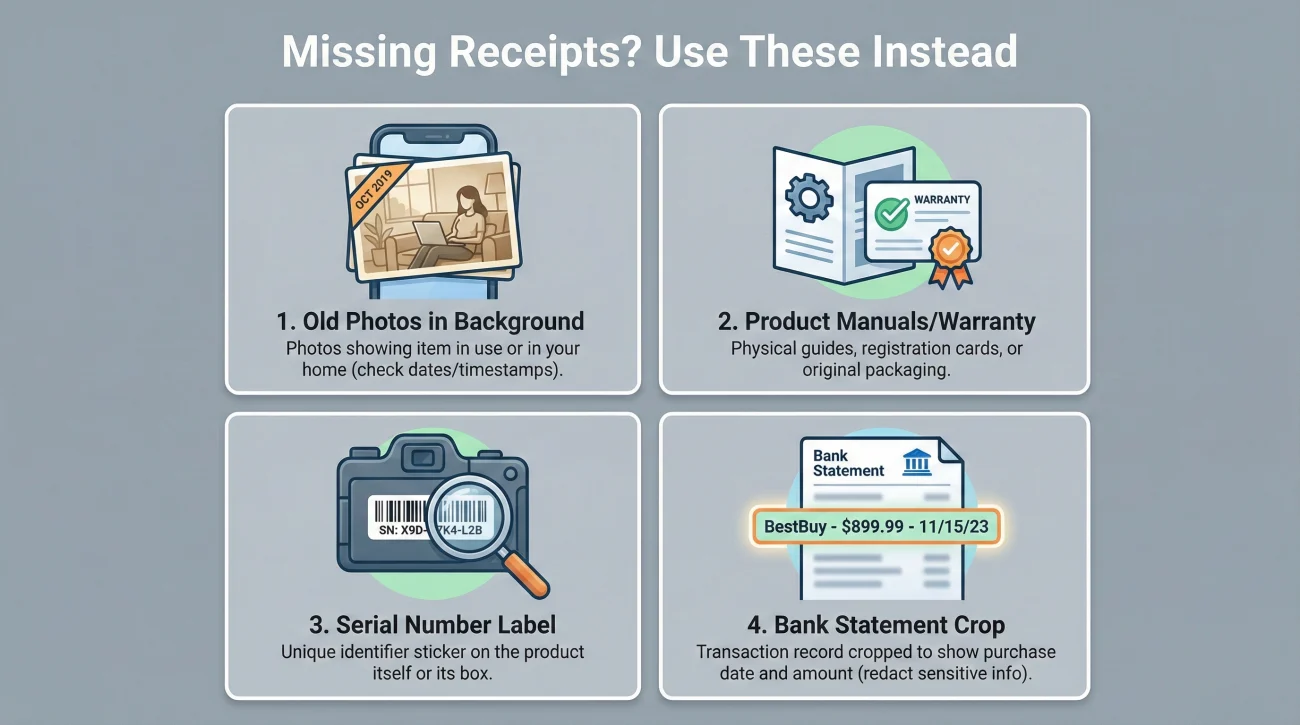
If you don’t have a receipt, you can often support ownership with a mix of other items. The key is to keep each piece tied to a specific line in your inventory, not floating around as random files.
- 🖼️ Photos showing the item in your space before the incident
- 📦 Manual, warranty info, or product registration confirmation
- 🏷️ Model and serial from a label you photographed
- 🏦 Relevant portion of a payment record that aligns with the item
⚠️ Warning: Keep payment proof minimal and relevant. If you include a record, crop or limit it to what supports the item and date. You don’t need to overshare to be organized.
A quick story from operations, in plain terms
I’ve seen two inventory submissions that were technically similar, but one moved smoothly and the other turned into weeks of back-and-forth. The difference wasn’t the items. The difference was packaging. The smooth submission had a clean inventory table, each support file named to match the item line, and a short index. The messy one had screenshots with no names and no mapping. Everyone had to guess. Guessing is where time disappears.
Common mistakes that quietly slow claims
These aren’t dramatic mistakes. They’re the small habits that create extra follow-up and extra sorting work. If you avoid them, you give your claim a better chance to move without constant friction.
Mistake 1: Sending photos without context
Close-ups alone can be hard to place. Pair them with wide shots and label them by room or area.
Mistake 2: Re-sending documents without asking what is actually missing
If you resend blindly, you can create duplicates in the file and make it harder to confirm receipt. Ask for the missing list in writing first.
Mistake 3: One giant submission with no index
Large uploads are harder to confirm. Smaller batches with a batch index are easier to track.
Mistake 4: No proof of submission saved
If you don’t save proof, you can’t resolve “we didn’t get it” disputes cleanly. Save proof every time.
Mistake 5: Following up with vague messages
“Any update?” is hard to answer. A follow-up referencing your batch, date, and index is actionable.
“Any update on my claim?”
“Could you confirm receipt of Batch 2 sent on [date], and tell me what documents are still required in writing?”
Fomular:
[Polite follow-up] + [Batch reference] + [What you need in writing] + [Receipt confirmation request]
What to do next when you feel stuck
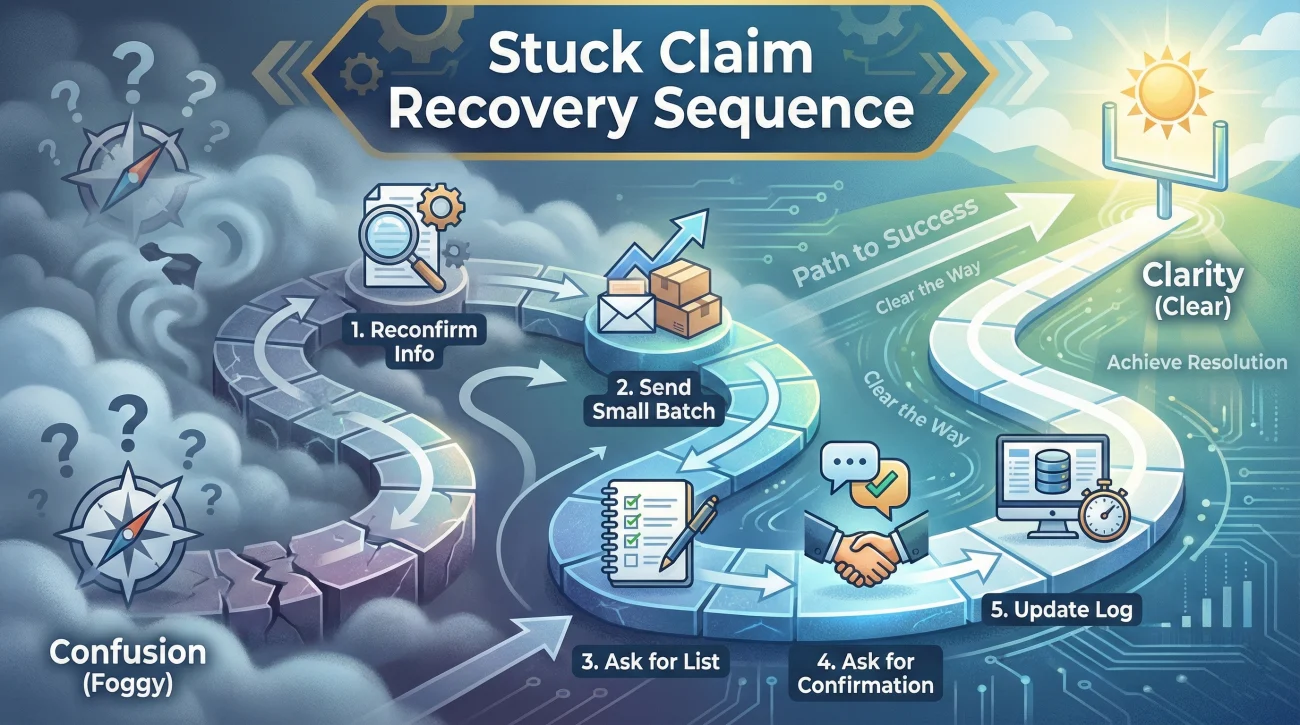
If your claim feels stalled, don’t panic and don’t spam attachments. Do one calm reset: rebuild clarity. In operations, clarity is what makes the next action obvious.
Here’s a simple sequence that tends to reduce confusion in many cases:
- ✅ Reconfirm your claim reference and contact route (email, portal, app)
- ✅ Send one small batch with an index (or resend the index only if files were already submitted)
- ✅ Ask for a written list of required documents
- ✅ Ask for written confirmation of what was received
- ✅ Update your log and save proof of submission
That’s it. It is not flashy, but it works because it turns a vague situation into a documented one. Once the requirements are in writing, you can build your next batch without guessing.
Re: Request for written list of required documents and confirmation of receipt
Hello,
I’m writing to confirm the required documents list for my claim and to confirm receipt of the documents I have already submitted. Please provide the remaining required items in writing, and confirm which documents you have received from my most recent submission.
Thank you,
[Your name]
[Claim reference number]
Pick the guide that fits your situation
If you’re not sure where to start, begin here. Open the accordion that matches what you are looking for, choose a guide, and follow the steps.
📄 Essential Checklists (Start Here)
This section covers the foundational lists you need to start your claim correctly.
| Guide | Why it helps |
|---|---|
| Homeowners Claim Paperwork: The Essential Packet to Send First | A baseline list of documents specifically for standard homeowners property claims. |
| Renters Insurance Claim Documents: Proving Loss Without Home Ownership | Focuses on proving contents ownership and loss when you don’t own the building. |
| Insurance Claim Forms Explained: A Plain English Guide to Paperwork | Explains common form types in plain English so you know what to keep. |
📝 Forms, Policy & Official Requests
Use these guides when you need to sign official forms or demand records from your insurer.
| Guide | Why it helps |
|---|---|
| Requesting a Complete Policy Copy: Why “”Declarations”” Are Not Enough | Ensures you get the full policy (not just Declarations) to understand your coverage. |
| Requesting Your Claim File: Why You Need the Full Adjuster Report | Lists exactly what records to ask for to see the adjuster’s full report. |
| Requesting an Itemized Estimate: How to Get Line-Item Details | Helps you get the line-item details needed to verify if the payout is fair. |
| Claim Authorization Forms: What You Are Permitting Before Signing | A safety checklist to review before you give permission to insurers or vendors. |
| Sworn Statement in Proof of Loss: A Guide to Avoiding Errors | Guides you through verifying facts and dates before signing legal proof of loss documents. |
| Insurance Release Forms: Checklist Before You Sign Away Your Rights | Crucial checks to ensure you aren’t accidentally closing your claim too early. |
✉️ Communication, Emails & Follow-ups
Guides for writing emails, logging calls, and handling communication blockers.
| Guide | Why it helps |
|---|---|
| First Claim Email Template: What to Include to Avoid Red Flags | Components and attachment order for your very first contact to avoid red flags. |
| Post-Inspection Follow-Up: Documenting What the Adjuster Saw | How to document exactly what the adjuster saw (and missed) right after they leave. |
| Claim Status Request: How to Write an Email That Gets a Reply | Questions that force a specific update instead of a generic “we are working on it.” |
| Confirming Receipt: How to Force the Insurer to Acknowledge Your Files | How to force the insurer to acknowledge they have your files in writing. |
| Insurance Says “Missing Documents”? How to Get a Specific List | Converts vague “missing info” requests into a specific list you can actually fulfill. |
| Repeated Document Requests: How to Respond Without Resending Everything | A protocol for when adjusters ask for files you have already sent. |
| Insurer Lost Your Files? The Clean Resubmission Protocol | Steps to resubmit your packet with proof if the portal or adjuster “lost” it. |
| Claim Communication Log: How to Track Calls with Your Adjuster | A framework for logging calls and linking them to your document index. |
🗂️ Organization, Naming & Proof of Submission
Systems to keep your files organized, safely stored, and easy to review.
| Guide | Why it helps |
|---|---|
| Proof of Submission: How to Track Every Claim Document You Send | Checklist of screenshots, headers, and timestamps to prove you sent it. |
| Insurance Portal Uploads: A Checklist to Prevent Missing Files | Hygiene checks and confirmation steps before you hit upload on an insurer portal. |
| Claim File Naming: How to Organize Documents for Your Adjuster | A strict file naming rule so adjusters can’t claim they “couldn’t find it.” |
| Claim Document Index: A One-Page Cover Sheet to Speed Up Review | How to make a simple cover sheet that speeds up the adjuster’s review. |
| Claim Recordkeeping: What to Keep and How to Store Your Files | Rules for physical and digital storage, including backups and version control. |
| ALE Documentation: Organizing Receipts for Temporary Housing Claims | How to organize receipts for temporary housing so you get reimbursed faster. |
| Correcting Claim Errors: How to Fix Paperwork Without Red Flags | Protocols for correcting errors in your documents without raising red flags. |
📅 Timeline, Money & Revisions
Manage dates, financial documents, and changes to the claim scope.
| Guide | Why it helps |
|---|---|
| Claim Paperwork Timeline: What Documents to Expect on Day 1, 7, and 30 | A timeline checklist showing exactly what paperwork is needed at each phase. |
| Date of Loss Documentation: Why Inconsistent Dates Kill Claims | How to create a consistent timeline record to avoid conflicting dates. |
| Claim Timeline Request: Questions That Force Specific Dates | Questions to ask your adjuster to pin down milestones and deadlines. |
| Tracking Estimate Revisions: Managing Multiple Versions of Your Claim | Version control rules for handling updated estimates and scope changes. |
| Mortgage Company & Insurance Checks: Documents to Release Your Money | The typical document packet needed to get mortgage lenders to release your funds. |
Final
A strong claim document trail is not about sending “everything.” It’s about sending the right pieces in a way that is easy to confirm. In my work, the claims that feel smoother usually share the same boring habits: a clean folder, filenames that make sense, small batches with an index, and proof saved every time something is submitted.
If you do nothing else, do this one thing: ask for requirements in writing, and ask for receipt confirmation in writing. That habit alone reduces confusion and protects your time. It turns the process from emotional guesswork into documented steps you can track.
If you’re unsure what to send, what you already sent, or what the insurer is still waiting on, start with Claim Documents.
❓ FAQ
🧾 What documents do I need for a property insurance claim?
Start with claim identity (reference and contact info), a one-page claim summary, and a clear photo set. Keep inventory and ownership proof organized and ready, then submit it as a structured packet when requested.
📷 How many photos should I send, and how should I label them?
Send a small set that tells a story: wide shots, close-ups, and at least one orientation photo. Rename files with date plus room or area so a reviewer can confirm what they’re seeing without guessing.
📦 Should I send everything at once?
Usually no. Smaller batches with an index are easier to confirm and less likely to get lost. Big submissions without an index can slow review because someone has to sort the pile.
✅ How do I prove I sent documents if they say they didn’t receive them?
Save proof each time: sent email as a PDF, portal confirmation screenshot, or any upload receipt. Keep those artifacts in a dedicated folder so you can reply with dates, batch names, and your file index.
🗂️ What is the simplest way to organize claim documents?
One folder with subfolders for photos, documents sent, proof of submission, correspondence, and inventory. Keep “documents sent” clean with final versions only.
🧠 What if I don’t have receipts for everything?
Use reasonable alternatives: photos showing the item in your space, manuals or warranty info, labels with model or serial numbers, and relevant portions of payment proof. Keep each support file tied to a specific inventory line.
📩 What should I ask for when they keep saying “missing documents”?
Ask for the missing list in writing and ask them to confirm what they have already received from your last batch index. Written clarity reduces repeated re-sending.
⏳ How often should I follow up?
Follow up when you have a specific, easy-to-answer request: confirm receipt of a batch, request the remaining requirements list, or confirm the next step. Keep follow-ups factual and tied to your log.
⚠️ Disclaimer: PropertyClaimChecklist.com provides practical guidance, process checklists, and example follow-ups to help you organize a property claim and move it forward. It is not policy language, claim documentation, legal content, or a substitute for your insurer's instructions. Always rely on your carrier's requirements and your actual policy terms for what must be submitted and how decisions are made.