- A low insurance payout is rarely an argument over the price of wood or drywall. It is often a debate about “missing scope”: the specific, necessary background tasks that were left off the paperwork.
- Estimating software is built on macros and templates that frequently overlook details like detaching appliances, floor protection, and debris removal.
- Instead of arguing the total dollar amount, audit the estimate document room by room and build a precise “Gap Log” to prove what the software missed.
- Submitting a structured Gap Log with a cover letter is often one of the most reliable ways to get a reviewer to approve a revision.
The Reality of a Stalled Estimate
I have seen thousands of homeowners open their first insurance estimate and immediately feel a sense of defeat. When you are looking at a $10,000 repair bid from your contractor and a $6,000 estimate from your insurer, it feels like a personal attack or a sign that you are being cheated. However, it is helpful to realize that the first estimate is almost always just a “first draft.”
When a file gets stalled, the problem is rarely that the insurance company is using “cheap” prices for paint or lumber. The missing money is usually hidden in the blank spaces of the report. In the industry, we call this “missing scope.” If a specific step, like moving your furniture or protecting your floors, is not listed as a line item, the money for it simply does not exist in the system.
This guide helps you move past the frustration and start acting like an auditor. We will look at your home through the eyes of the estimating software, find exactly where the computer “forgot” the reality of your house, and build a Gap Log that is much harder for a reviewer to overlook. This is not about negotiating; it is about correcting the record.
Gaps vs. Errors: What Are You Looking For?
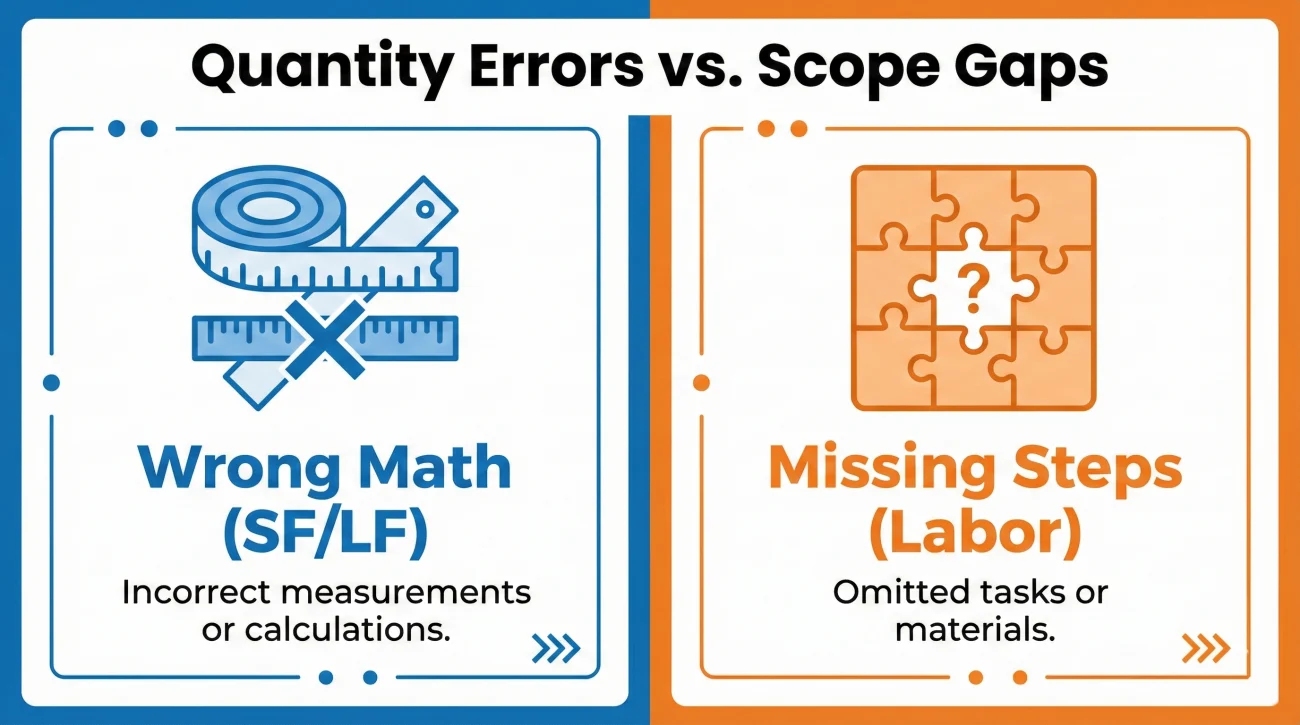
There is a difference between an insurance estimate that is “wrong” and one that is “missing items.” Understanding this distinction changes how you write your Gap Log.
Quantity Errors
A quantity error is when the insurer agrees you need new carpet, but they only measured for 200 square feet when your room is actually 300 square feet. This is a simple measurement mistake. Correcting it is easy: you provide a floor plan or your contractor’s measurements and ask the adjuster to update the “QNT” column.
Scope Gaps
A scope gap is when the square footage is correct, but the *steps* required to do the work are missing. For example, they paid to replace the 300 square feet of carpet, but they forgot to pay for the labor to move the heavy piano out of that room first. Correcting this requires adding an entirely new line item (Content Manipulation).
In many cases, a low estimate is a combination of both. When you build your log, separate these into categories. Adjusters can fix a quantity error in seconds, while a scope gap might require a brief explanation of why the extra step is physically necessary.
How Software Macros Create Gaps
To audit an estimate effectively, you have to understand how it was created. Desk adjusters and field inspectors use industry-standard software that relies heavily on “macros.” A macro is a pre-built template of tasks. If an inspector clicks the “Replace Carpet” macro, the software automatically adds the carpet and the labor to install it.
But here is the catch: those macros are generic. The software does not know that your specific kitchen has a heavy, built-in refrigerator that must be moved by two people before the floor can be touched. It doesn’t know that your bathroom has custom crown molding that will crack if the drywall isn’t handled with extreme care. If the inspector doesn’t manually “add” those specific steps, they stay missing.
When reviewing these files, I often see that the gap between your contractor’s bid and the insurance estimate is actually just a dozen or more “small” missing tasks. When you add those up across five rooms, that is where a material gap is hiding.
Field Note: A common pattern I see in claims that go to dispute is a failure to document the “Detach and Reset” items. For example, an adjuster might pay for new bathroom tile but forget the plumber’s labor to remove and reinstall the toilet. The fix is often as simple as adding a line item for the plumber, which can bridge a gap of a few hundred dollars instantly.
The Insider’s Scope-Gap Checklist
I want you to walk through each damaged room with your estimate in hand. Do not look at the prices. Look only at the “Description” column. If you see a repair happening in your house that is not on that paper, it is a gap. Here are the four categories to check first.
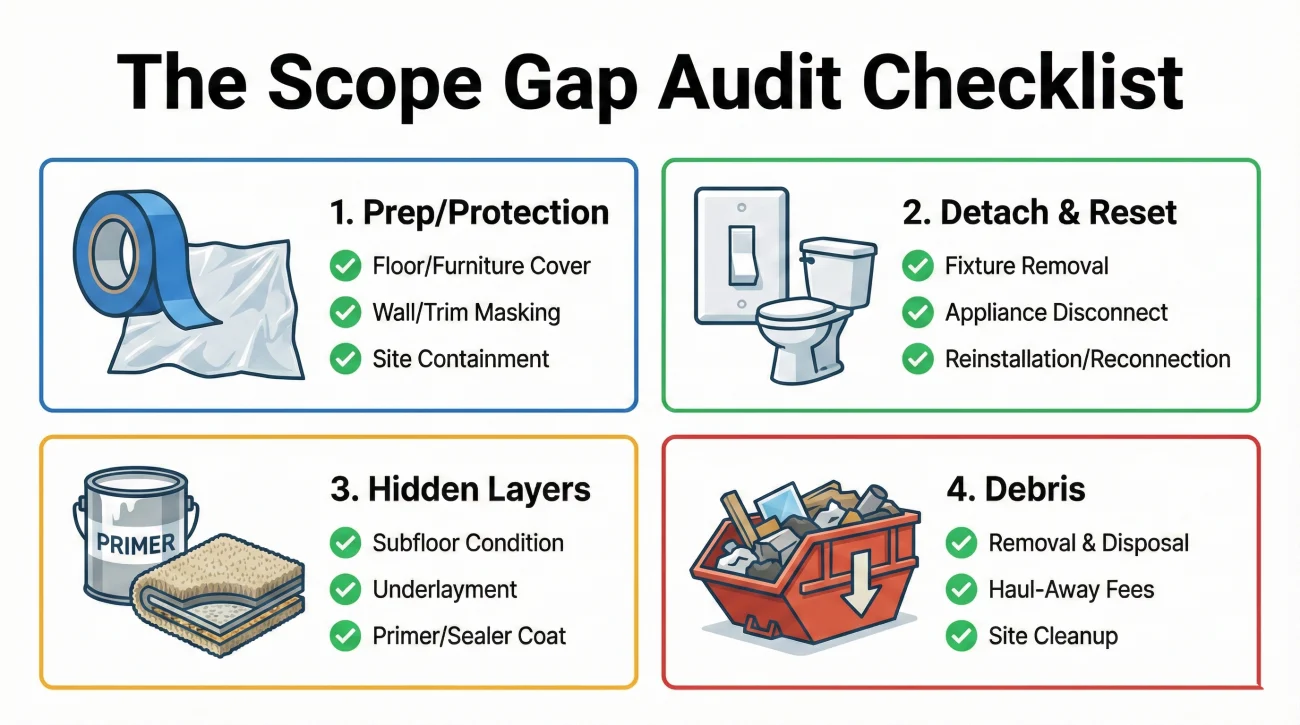
1. Prep, Protection, and Containment
This is the most frequently ignored category because it is “invisible” once the job is done. But these steps cost your contractor real time and money.
- 🔎 Content Manipulation: Does the estimate pay for the labor to move your sofa, bed, and dressers out of the room so the floor can be replaced?
- 🔎 Floor Protection: If workers are walking through your clean hallway to get to a damaged bathroom, did the insurer pay for “Ram Board” or protective plastic?
- 🔎 Dust Barriers: If there is demolition involved, did they include “Zip-Walls” to prevent drywall dust from coating your entire home?
- 🔎 Masking: For painting jobs, did they include the time to tape off windows, trim, and fixtures?
2. The “Detach and Reset” (D&R) List
This is the technical term for taking something off the wall or floor and putting it back later. If the estimate says “Paint Wall,” it must also include the D&R for everything on that wall.
- 🔎 Electrical: Outlet covers, switch plates, wall sconces, and thermostats.
- 🔎 Plumbing: Toilets, pedestal sinks, shower heads, and dishwasher hookups.
- 🔎 Fixtures: Blinds, curtain rods, towel bars, and heavy mirrors.
3. Foundational and Hidden Layers
The software often pays for the “skin” (the paint or carpet) but ignores the “bone” (the underlayment or primer). These layers are often just as damaged as the surface.
- 🔎 Sealers/Primers: If you have water stains, you cannot just paint over them. You need a dedicated line item for “stain-blocking primer.”
- 🔎 Flooring Layers: Does the estimate include the carpet pad? Does it include the cement backer board under the tile?
- 🔎 Quarter Round: If they are replacing the baseboards, did they also include the “shoe molding” at the very bottom?
4. Debris and Final Cleanup
Getting the ruined material out of your house and cleaning up the mess is a major cost that macros often underestimate.
- 🔎 Dumpster Fees: Is there a specific line item for a roll-off dumpster and the associated “tipping fees” at the landfill?
- 🔎 Haul Debris: If it is a small job, is there a “Haul Debris” labor charge?
- 🔎 Final Cleaning: Did they include a “Construction Clean” line item so you are not left with a thin layer of dust on every surface?
Organizing the Evidence: The Gap Log
A common mistake homeowners make is forwarding a flat contractor bid and asking the insurer to match it. From a reviewer’s perspective, matching a price is difficult without knowing what is missing. If your contractor’s bid is just a lump sum, there is no way to see the gaps.
Building a “Gap Log” is a simple document that points to the exact missing pieces. It makes the reviewer’s job easy, and when you make a reviewer’s job easy, your file often moves much faster.
| Room Name | Physical Reality (The Gap) | Missing Line Item Needed |
|---|---|---|
| Master Bedroom | Heavy wardrobe and bed block the floor. | Content Manipulation (Move Out/In) |
| Kitchen | Drywall repair is behind the refrigerator. | Detach and Reset Refrigerator |
| Living Room | Severe water staining on the ceiling. | Stain-blocking Primer (KILZ or similar) |
| Hallway | Workers must walk through to get to bathroom. | Floor Protection (Cardboard/Plastic) |
When you present your findings this way, you are no longer “complaining about money.” You are “correcting a scope omission.” That is a much stronger position to be in.
Scenario: The Omitted Prep Work
Let us look at how this works in a real-world situation. I once reviewed a file where a kitchen had suffered a pipe burst. The insurance estimate was $4,500, but the contractor’s itemized bid said it would cost $5,800. The difference was not the price of the cabinets; it was the prep work.
The insurance estimate included “Replace Base Cabinets.” However, the software macro completely missed the fact that the granite countertop had to be carefully supported during the process. It also missed the plumbing labor to disconnect the sink and the “masking” required to protect the rest of the kitchen from demolition dust.
The policyholder did not argue the total. Instead, she used a Gap Log to list these specific items. She showed a photo of the granite countertop and asked: “How can the cabinets be replaced without supporting the granite or disconnecting the sink?”
Because these were logical, operational requirements, the desk adjuster added the line items for “Countertop Support” and “Plumbing Disconnect.” The total estimate was updated within a few business days. No legal threats were needed, just better documentation.
“The current estimate for the kitchen (Page 4) includes cabinet replacement but omits the labor to detach and reset the sink and faucet. Since the sink is undermounted to the granite, this step is physically required before the cabinets can be removed. Please add the appropriate plumbing D&R line items.”
Common Mistakes When Spotting Gaps
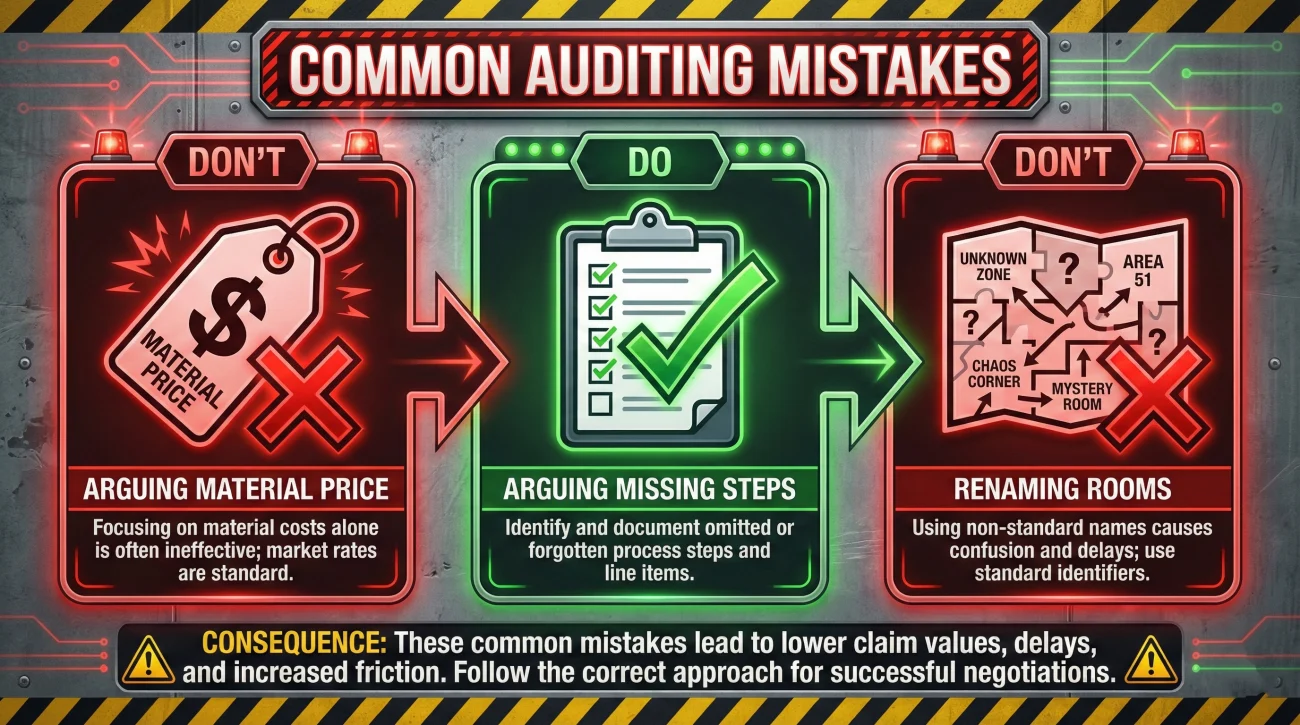
Even with the best intentions, homeowners can trip up on specific points that cause a reviewer to reject their Gap Log. Avoid these common pitfalls to keep your file moving.
- ❌ Focusing on “Material Quality”: Do not waste time arguing that the insurance company used cheap wood unless you have the original purchase receipt proving you had high-end custom materials. Focus on the steps first.
- ❌ Renaming the Rooms: If the adjuster called the room “Bedroom 1,” do not call it the “Blue Room” in your Gap Log. Use the exact names from the estimate so the reviewer does not get lost.
- ❌ Assuming “Total” Means “Complete”: Many people think that because the estimate says “Repair Living Room,” every possible task is included. It is not. You must read every single line item to ensure the scope matches the work.
- ❌ Forgetting the “Before” Photos: If you claim a line item is missing for a damaged baseboard, but you do not have a photo of that baseboard, it is much harder to justify adding it to the file. Evidence is the engine of the Gap Log.
How to Submit Your Findings
The way you deliver this information is just as important as the information itself. You want to sound like a professional partner. Your goal is to help the adjuster “correct” their report. This structured approach is the backbone of a successful low estimate documentation response.
I recommend sending your Gap Log with a formal cover letter. This signals that you have done your homework and that you expect a professional review of the missing items.
[Action] + [What you need in writing] + [Confirmation request]
Date: [Date]
To: [Adjuster Name / Claims Department]
Claim Number: [Your Claim Number]
Subject: Request for Estimate Revision – Missing Scope Items
Dear [Name],
I have received and reviewed the initial repair estimate dated [Date]. After performing a room-by-room audit and consulting with my contractor, we have identified several necessary scope items that appear to have been omitted from the current line-item breakdown.
I have attached a “Gap Log” detailing these specific tasks, including required detaching and resetting of fixtures, site protection, and necessary prep work, which are required to restore the property to its prior condition. I have also included itemized bids from my contractor that mirror these specific scope requirements.
Could you please review these additional line items and advise if the estimate can be revised to reflect this complete scope of work? If any of these items are not covered under the policy, I would appreciate a written explanation so I can coordinate with my repair team.
Please confirm receipt of this request and let me know the expected timeframe for the review. I look forward to your response.
Sincerely,
[Your Name]
Moving Toward a Fair Scope
I know how exhausting it feels to fight for every dollar while your home is in disarray. But in the world of claims operations, the person who provides the best map often gets the fastest results. By shifting your focus from “price” to “scope,” you take the emotion out of the argument and replace it with undeniable logic.
Audit your rooms. Find the missing prep, the forgotten detaching, and the hidden layers. Build your Gap Log and present it calmly. Most adjusters are not trying to underpay you; they are simply working with limited information and generic software templates. When you give them the right information, organized the right way, you give them the tools to pay you fairly.
This organized, factual approach is often one of the most reliable ways to bridge the gap and move your claim toward a successful resolution.
❓ FAQ
📄 What if my contractor refuses to provide an itemized bid?
A desk adjuster cannot use a lump-sum bid to justify adding specific line items. If they will not itemize, ask whether they can break it out at least by trade or by room. If they still refuse, it may be worth getting a second opinion from a contractor who understands insurance requirements.
🕵️♂️ How do I prove that a layer under my floor was damaged?
The best way is to take a photo during the demolition. If the contractor pulls up the carpet and the pad is soaked, take a photo immediately. That is your proof for the missing “carpet pad” line item.
🧱 Will they pay for me to move my heavy furniture?
Yes, in many cases. Look for a line item called “Content Manipulation.” If it is missing and the furniture is blocking the repair, add it to your Gap Log as a labor requirement.
💬 Should I call the adjuster to argue before I send the log?
I recommend sending the written Gap Log first. This gives the adjuster a chance to review the facts before you speak. It makes the follow-up phone call much more productive.
⏳ How long does a “supplement” review usually take?
It depends on the company, but if your Gap Log is clear and well-documented, a review often takes 5 to 10 business days. Disorganized requests take much longer.
🚽 If they remove my toilet, do they owe for a new wax ring?
Yes. The Detach and Reset line item for a toilet usually includes a small amount for “consumables” like a wax ring. If it does not, ensure it is listed separately in the plumbing scope.
🧹 Is construction cleanup mandatory in an estimate?
It is a standard industry practice. If the repairs create dust or debris, the insurer should include a line item for a “final clean” of the work area. If it is missing, log it.
🛑 What if the adjuster says the missing item is “covered in the labor rate”?
Ask for that in writing. In many cases, specialized prep work like dust containment is not included in the standard hourly rate for a painter or carpenter and should be a separate line item.
💵 Can I still add missing items after I have cashed the check?
Usually, yes. Cashing the initial check is often seen as an “undisputed” payment, not a final settlement. You can still submit supplements for missing scope items as the work progresses.
📸 Can I submit a Gap Log even if I don’t have a contractor yet?
Absolutely. If you can see that a room was missed or a toilet was not accounted for, you can submit those findings independently using your own photos as proof.
⚠️ Disclaimer: PropertyClaimChecklist.com provides practical guidance, process checklists, and example follow-ups to help you organize a property claim and move it forward. It is not policy language, claim documentation, legal content, or a substitute for your insurer's instructions. Always rely on your carrier's requirements and your actual policy terms for what must be submitted and how decisions are made.