
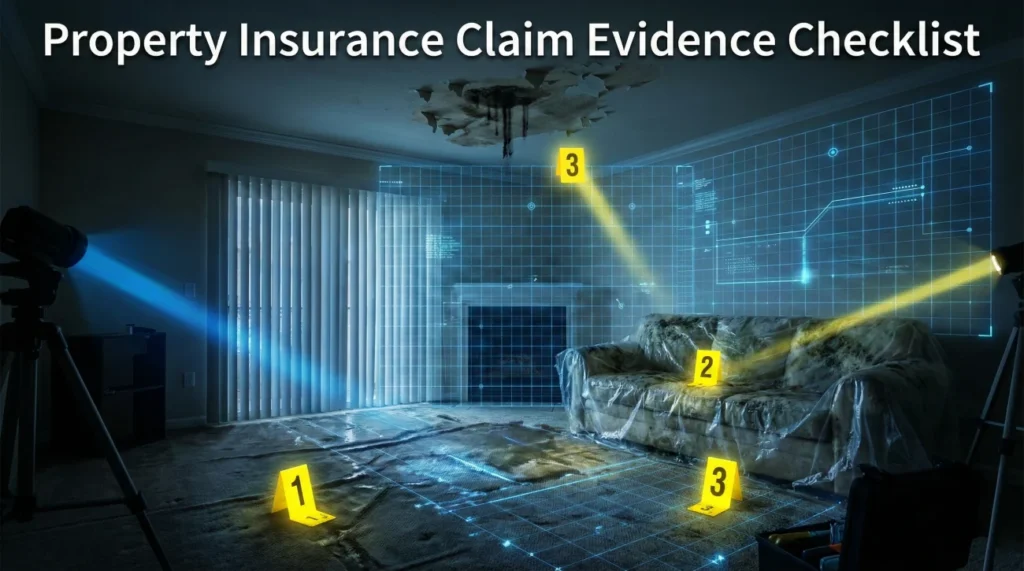
- Capture Before You Clean: The “Golden Hour” for evidence is right after the loss but before you touch a broom. Once debris is moved or water is dried, the narrative changes forever.
- The “Digital Locker” Strategy: Never leave claim photos mixed in your personal camera roll. We build a specific folder structure to keep the claim organized and accessible.
- Labeling Removes Ambiguity: An adjuster cannot easily review a file named “IMG_4022.jpg” because it tells them nothing. They can validate “Living_Room_Ceiling_Leak_Wide_Shot.jpg” much faster.
- The Mapping Rule: Good evidence connects the dots. Item #14 on your inventory list must match Photo #14 and Receipt #14.
The Difference Between “Knowing” You Are Right and “Proving” It
In my years working in claims operations, I have seen a painful pattern repeat itself. A homeowner suffers a legitimate loss, such as a pipe burst, a kitchen fire, or a theft. They know exactly what happened. They know exactly what they lost. They know the value of their property. But six weeks later, they are bogged down in a slow process where the adjuster is offering 30% of the expected repair cost.
Why does this happen? Usually, it is not because the insurer is acting in bad faith. It is because the evidence provided was invisible, disorganized, or incomplete. An adjuster sitting at a desk 500 miles away cannot “see” what you saw. They can only see what you document. If the photo is blurry, the damage remains unverified. If the receipt is missing, the value is often depreciated by default. If the file is lost, the line item is denied.
In claims operations, there is a simple operational truth: If you didn’t photograph it, log it, or save the receipt, it can be hard to prove it exists later.
So in this post, I am going to walk you through the exact evidence system I have seen work best in real claim files, what to capture, how to organize it, and how to link everything together so your proof is easy to review.
Phase 1: The “Golden Hour” Capture Workflow
The most critical evidence is captured in the first 24 hours, often before the adjuster is even assigned to your file. This is what we call the “Golden Hour.” Once you start cleaning up, throwing away wet carpet, wiping down soot, or patching holes, you are effectively removing the primary evidence.
⚠️ Safety First: Never enter a structurally unsafe building or standing water with active electricity just to get a photo. Your life is worth more than the claim. If it is unsafe, take photos from the doorway or the exterior only.
1. The Narrated Video Walkthrough
Before you take a single photo, pull out your phone and record a continuous video. Start at the street view showing your house number to establish location, then walk through the entire affected area.
The Script Strategy: Narrate what you are seeing and hearing. “I am walking into the kitchen. It is 2:00 PM on Tuesday. The water is actively dripping from the ceiling fixture. There is standing water on the hardwood floors extending into the hallway. I can smell smoke.” This video establishes the “Loss Context” that individual static photos often miss. It proves the condition of the home immediately after the event.
For a detailed shot list on video capture, see our specific guide on “Video Walkthroughs for Claims.”
2. The 3-Step Photo Zoom Technique
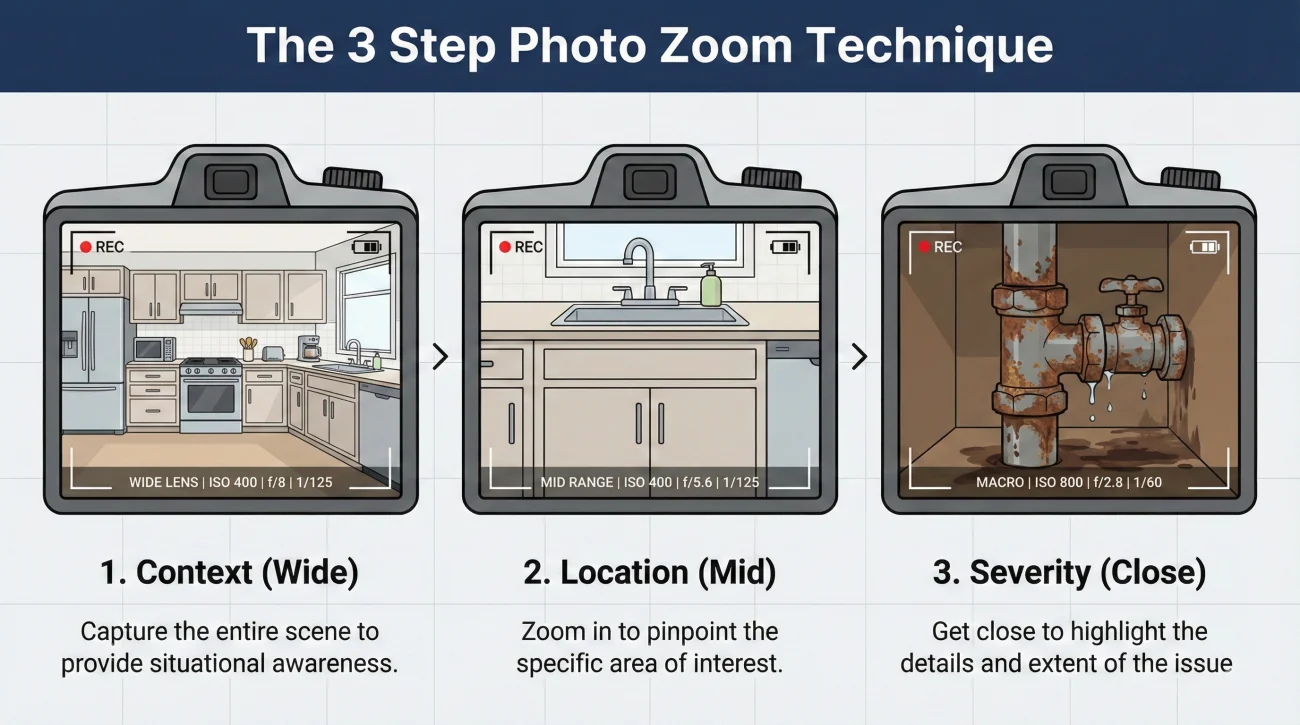
A common amateur mistake is taking 50 close-up photos of moldy baseboards without showing where they are. An adjuster looking at a close-up of a baseboard has no idea if it is the kitchen, the bathroom, or the neighbor’s house. Context is key.
Use the Wide-Mid-Close technique for every single damaged area:
- 📸 Step 1: Wide Shot (The Room Context). Stand in the doorway or the corner. Capture all four corners of the room. Show the layout. This proves “Where” the damage is located.
- 📸 Step 2: Mid Shot (The Area). Step closer. Show the damaged wall section relative to a window, door, or cabinet for scale. This proves the “Extent” of the damage in that specific area.
- 📸 Step 3: Close Shot (The Detail). Get close. Show the texture of the water stain, the crack in the tile, the model number on the appliance, or the soot on the outlet. This proves the “Severity” of the damage.
3. The Exterior Perimeter Scan
Even if the damage is internal (like a pipe burst), you need exterior photos to prove the condition of the home was sound otherwise. If the damage is external (storm/hail), this is vital.
- Roof: If safe, photograph shingles, flashings, and vents. If not safe, photograph the roof from the ground using zoom. Look for missing tabs or impact marks.
- Siding and Elevations: Photograph all four sides of the house (North, South, East, West). This creates a baseline for what was not damaged as well as what was.
- Debris Field: If a tree fell or siding blew off, photograph the debris on the ground before you clean it up. The quantity of debris often helps prove the severity of the wind event.
Phase 2: Building Your “Digital Evidence Locker”

In operations, we frequently see claims fail simply because the homeowner loses track of their own files. “I think I sent that receipt last Tuesday” is not a strategy. You need a centralized system. Do not rely on your email “Sent” folder, which is hard to search and organize.
Create a master folder on your computer or a secure cloud drive (like Google Drive or Dropbox) named: [Your Last Name] - Claim Master File. Inside that master folder, create these four specific sub-folders. This structure helps you maintain control over your own data.
- 📂 01_Structural_Evidence: This is for the house itself. Store photos of walls, floors, and roof here. Save your contractor’s repair estimates and any engineering or inspector reports in this folder.
- 📂 02_Contents_Evidence: This is for your stuff. Store your Master Inventory Spreadsheet here. Create sub-folders for “Photos of Items” and “Receipts and Manuals.”
- 📂 03_Expenses_ALE: This is for your living costs. Store hotel folios, food receipts, and temporary housing agreements here. If you move out, this folder becomes your financial lifeline.
- 📂 04_Reference_Notes: Use this for your internal records. Store your personal timeline log, conversation notes, and claim reference numbers here. Keep your own “source of truth” separate from the insurer’s portal records.
Having this structure means that when you need to prove a hotel stay, you don’t have to dig through your purse or scroll through texts. You go to Folder 03 and pull the PDF. It signals that you are organized and professional.
💡 Pro Tip: Keep a “Working” folder and an “Originals” folder. Never edit your original photos. If you need to crop a photo or add an arrow to highlight damage, save it as a copy. Metadata (the hidden date and location data inside a photo) is crucial for proving when the damage happened. Editing the original can destroy that metadata.
Phase 3: Labeling and Indexing Rules
An adjuster might review 10 or 20 files a day. If you have a folder containing 50 files named “IMG_001.jpg” through “IMG_050.jpg,” you are creating friction. You want your evidence to be self-explanatory.
The “Date-Room-Item” Naming Rule
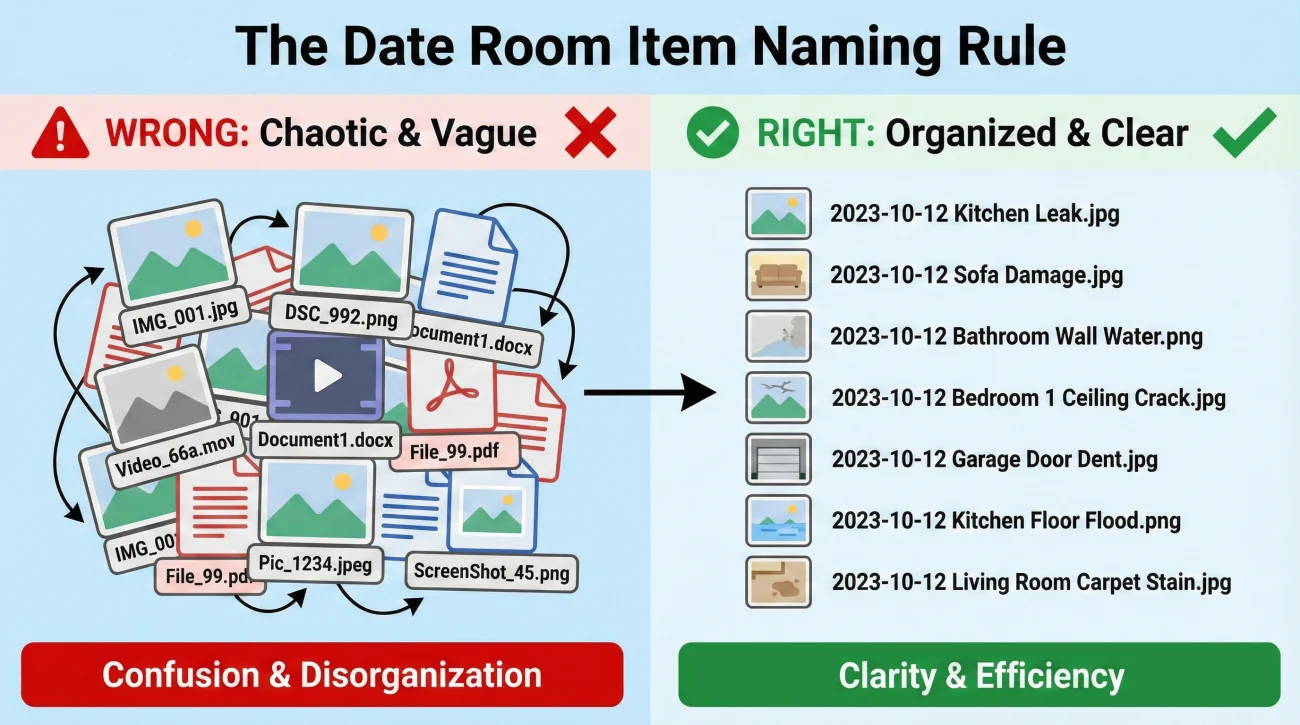
Rename your files before you save them to your evidence locker. It takes 10 minutes of work but creates a permanent record that cannot be misinterpreted.
Format: [Date] - [Room] - [Detail]
2023-10-12 - Kitchen - Under Sink Leak Source.jpg
2023-10-12 - Living Room - Water Damaged Sofa Overview.jpg
2023-10-15 - Receipt - Home Depot - Tarp and Tape.pdf
2023-10-16 - Invoice - RotoRooter - Emergency Shutoff.pdf
The Photo Index (The “Map”)
If you have more than 20 photos, create a simple Word document or PDF called “Photo Index” that lists them. This acts as a table of contents for your evidence.
Example Structure:
Photo 1-5: Kitchen overview showing standing water and damaged hardwood.
Photo 6-10: Close-ups of the burst pipe under the sink (Source of Loss).
Photo 11-15: Living room ceiling damage directly below the kitchen leak.
Photo 16-20: Damaged personal property (sofa, rug, electronics) staged in the garage.
💡 Rule of Thumb for Indexing: Group your index logically: Source of Loss first (what caused it), then Resulting Damage (what got wet), then Personal Property (what items were ruined).
We cover advanced labeling strategies in our “How to Label Photos” guide.
Phase 4: Documenting Personal Property (Contents)
This is usually the most tedious part of the claim. You need to list every single item that was damaged. If it isn’t on the list, it isn’t in the check. Accuracy here translates directly to dollars.
The Master Inventory Spreadsheet
Create a spreadsheet with these specific columns. This format matches the software adjusters use (like Xactimate), making the data entry instant. If they can copy-paste your data, they will review it faster.
- Item #: This is vital for mapping proof later (e.g., Item 001).
- Description: Be specific. Include Brand, Model, Size, and Color. (e.g., “Sony Bravia 55-inch 4K LED TV, Model XBR-55X900F”).
- Quantity: How many were lost?
- Age: Approximate age in years. This helps them calculate depreciation.
- Condition: Average, Good, or Excellent. Be honest. Most used items are “Average.”
- Replacement Cost: The price to buy a brand new one today at a standard retailer (like Best Buy or Target). Do not use eBay or craigslist prices.
- Proof Reference: A column where you note “See Photo #14” or “See Receipt #3.”
“I Don’t Have Receipts” Strategy
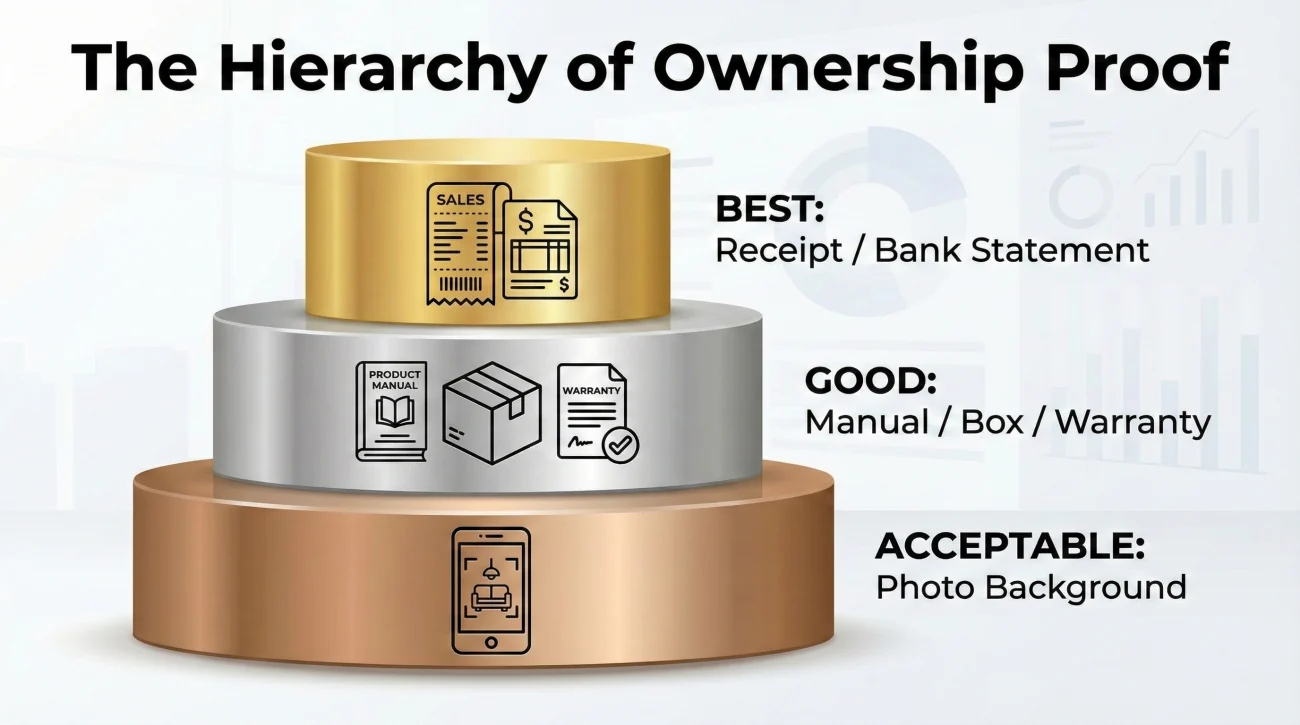
We cover this deeply in our “No Receipts” guide, but the short rule is: Evidence Tiers.
- 🥇 Tier 1: Original Receipt, Email Order Confirmation, or Credit Card Statement.
- 🥈 Tier 2: Product Manual, Warranty Card, Original Box, or Repair Record.
- 🥉 Tier 3: A photo of the item in your house. For example, a TV visible in the background of a birthday party photo proves you owned it.
Never leave an item off the list just because you lost the receipt. List it, and in the “Proof Reference” column, note “Photo Proof Available.”
The “Junk Drawer” Evidence Hunt
Don’t throw away the contents of your junk drawers. Old remote controls prove you owned the TV. Old charging cables prove you owned the device. Instruction manuals are gold mines for proving model numbers of appliances that burned up or were stolen. Photograph these items before disposing of them.
Phase 5: Documenting Mitigation (Stopping the Damage)
Your policy likely requires you to take “reasonable steps” to prevent further damage. This is called mitigation. You must prove you did this, or the insurer can deny coverage for secondary damage (like mold that grew because you didn’t dry the floor).
What to Capture
- The “Before” Shot: Photograph the hole in the roof before you put the tarp on it. This proves the hole existed and wasn’t caused by you nailing down the tarp.
- The “During” Shot: Photograph the drying fans set up in the hallway. Photograph the dehumidifiers running. This proves you took action.
- The Hardware Receipts: Keep the receipt for the tarp, the duct tape, the plywood, and the wet-vac rental. These are fully reimbursable expenses.
- The Service Invoices: Keep the invoice for the plumber who shut off the water or the tree service that removed the branch from the roof.
See our “Mitigation Receipts and Logs” guide for a dedicated checklist on this topic.
Key Point: Keep the damaged parts! If a plumber replaces a burst pipe fitting, do not let them throw the old fitting away. Put it in a Ziploc bag and label it. The part itself is evidence.
The Advanced Move: “Evidence Mapping”
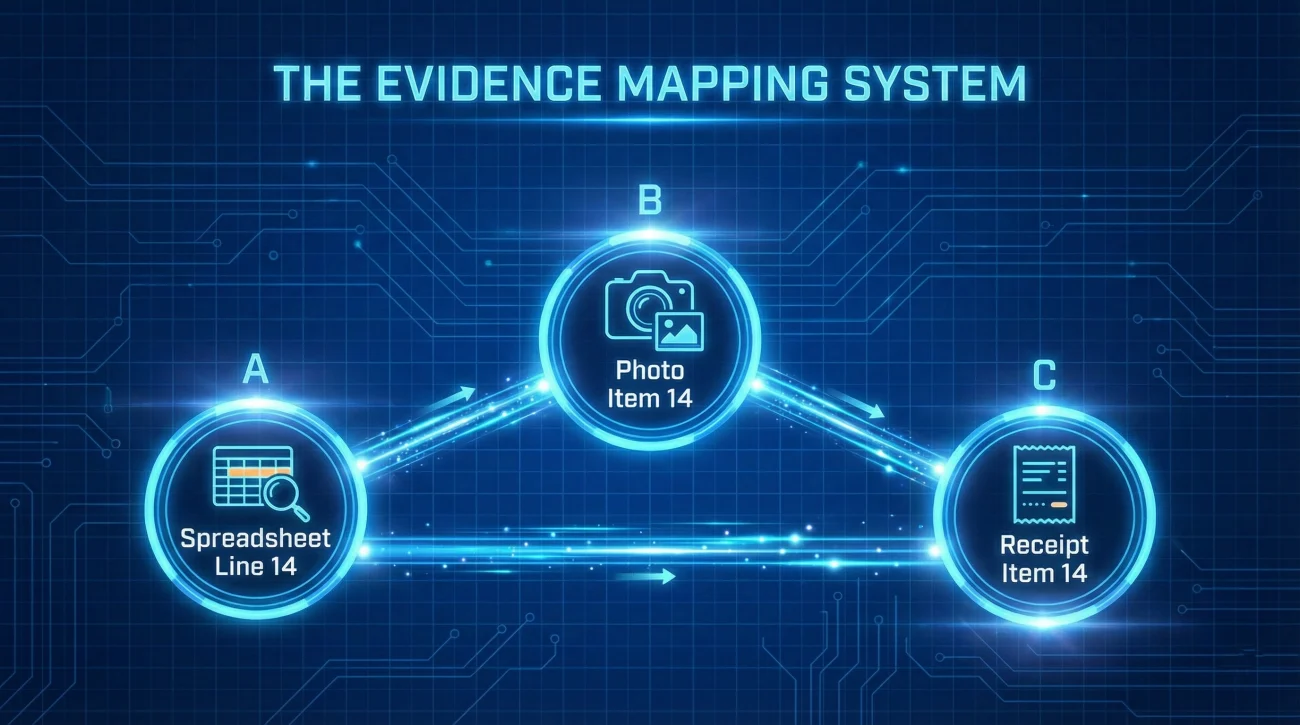
This is the secret weapon of efficient claims. You want to link your documents together so the adjuster never gets lost. We call this “Mapping.”
The Link: Use the “Item #” from your inventory spreadsheet as the common key.
- Spreadsheet: Line 14 is “55-inch Sony TV”.
- Photo: Name the file
Item-14-SonyTV-Damage.jpg. - Receipt: Name the file
Item-14-SonyTV-Receipt.pdf.
When anyone reviews the claim record, whether it is the desk adjuster, a field inspector, or even yourself three months from now, they see the logic immediately. Item 14 matches Photo 14 matches Receipt 14. This reduces the back-and-forth friction significantly because you have done the organizational work for them.
Phase 6: Handling Late Discovery Evidence
Sometimes damage isn’t visible on Day 1. Mold might appear behind a cabinet three weeks later. An electrical outlet might stop working a month after the water loss. This is normal, but you must document it correctly.
The “Supplemental” Workflow:
- Stop: Do not disturb the new damage until documented.
- Photograph: Take new Wide-Mid-Close photos of the newly discovered issue.
- Log: Create a note in your Reference Notes folder with the date of discovery. “October 20th: Discovered mold growth behind baseboard in kitchen.”
- Update Index: Add these new photos to your Photo Index and update your Evidence Timeline Log. Ensure the metadata proves the date was later than the initial loss.
Do not wait until the end of the claim to bring this up. Documenting it as it happens helps keep the file consistent and reduces confusion later.
Common Evidence Mistakes to Avoid
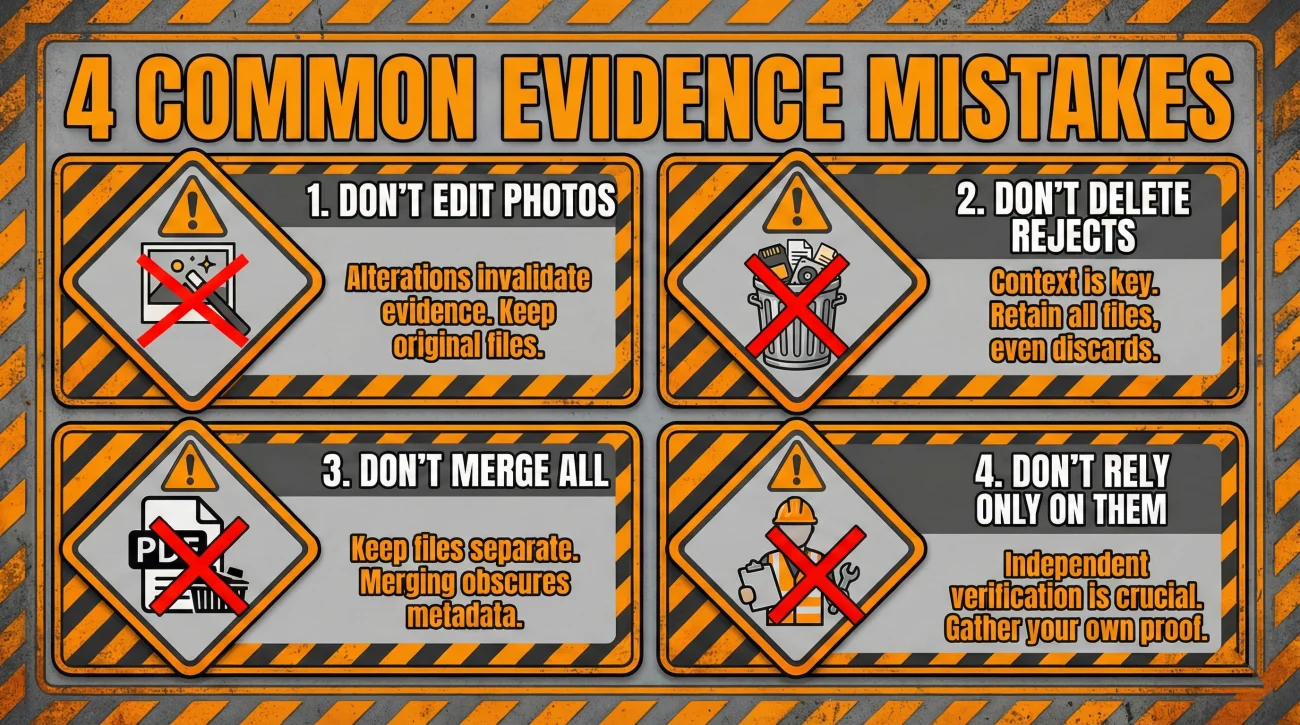
1. Editing or Altering Photos
Never use filters, crop heavily, or alter the metadata of your claim photos. If something looks off, reviewers may ask extra questions or request originals, and that can slow everything down. Keep originals untouched, and if you need to highlight something, do it on a copy.
2. Deleting “Bad” Photos Too Soon
You might think a photo is blurry or useless, but it might show a tiny detail in the corner (like a brand name on a box or the color of a rug) that becomes crucial later. Never delete evidence until the claim is fully closed and paid. Move “bad” photos to a “Rejects” folder instead of the trash.
3. The “One Giant PDF” Error
Do not scan 50 receipts and 100 photos into one massive 200-page PDF file. This is impossible for the adjuster to sort through. Keep files separate and named individually. If you must combine receipts, group them by category (e.g., “All Kitchen Receipts.pdf”).
4. Relying Solely on the Contractor’s Photos
Contractors take photos to prove they did the work and to justify their bill. They do not necessarily take photos to prove your coverage. Their photos might miss the specific “origin of loss” details the insurer needs. Always take your own independent set of photos to ensure you control the evidence.
Build Your Evidence Package
Evidence is the only thing that separates a paid claim from a denied one. If you are unsure which documents you need, use these lists to gather the right proof.
📸 Photos, Videos & Visual Proof
| Guide | Why it helps |
|---|---|
| Damage Photo Checklist for a Property Claim: What to Capture Before Cleanup | Start Here: The minimum shot list you must have before you move a single piece of debris. |
| Room by Room Damage Documentation: A Simple Evidence Pack Flow | A systematic workflow to ensure you don’t miss hidden damage in corners or closets. |
| Video Walkthrough for a Claim: What to Record So It Counts | How to record a one-take video that proves the layout and context of the loss. |
| Structural Damage Evidence: What to Capture for Dwelling Claims | Focuses specifically on walls, floors, and roof issues (distinct from your personal belongings). |
| Before You Throw Anything Away: Capture This Evidence First | Crucial for debris and ruined items—once they are gone, your proof is gone. |
| Photos Taken Later: How to Add Context Without Making Claims You Cannot Prove | How to handle evidence captured days or weeks after the event without confusing the timeline. |
🧾 Inventory & Ownership Proof
| Guide | Why it helps |
|---|---|
| Home Inventory for a Claim: What to List and How Detailed It Needs to Be | Helps you build a master list of lost items that meets insurer requirements. |
| Inventory Index: A One Page Summary That Links Items to Proof | Creates a clean cover sheet that summarizes your entire loss for the adjuster. |
| No Receipts: How to Prove Ownership Without Inventing Anything | Strategies to prove you owned items using manuals, photos, or bank records instead of receipts. |
| Proof of Ownership Examples: What Usually Counts and What Usually Fails | Clarifies what counts as “strong” versus “weak” proof so you know where you stand. |
| Receipts for a Claim: What Details Matter and How to Use Weak Receipts Safely | How to use faded, partial, or old receipts as valid evidence. |
| Personal Property Evidence: What Helps When You Are Proving Contents | Specific evidence rules for clothing, electronics, and furniture. |
🗂️ Organization, Naming & The System
| Guide | Why it helps |
|---|---|
| Evidence Checklist: A Simple Structure That Routes to the Right Articles | A master list structure to help you organize which evidence goes where. |
| Organize Evidence: A Folder Structure You Can Maintain Under Stress | Sets up a digital filing cabinet that keeps thousands of claim files manageable. |
| How to Label Claim Photos So Reviewers Can Follow Them | Naming rules that let the adjuster know exactly what they are looking at without asking you. |
| Keep Original Evidence Files: The Rule That Prevents Doubts Later | Why you must never edit the original file metadata and how to store backups safely. |
| Photo Index: Turn Evidence Into Something Reviewers Can Read | Turns a pile of images into a referenced list that is easy for a desk adjuster to review. |
| Evidence Mapping: Link Photos, Items, and Receipts So Nothing Floats | The advanced technique of linking specific photos to specific inventory lines and receipts. |
| Photos Too Large to Share: Deliver Evidence Without Losing Originals | How to deliver high-quality evidence when email attachments or portals reject the file size. |
| Uploaded Photos Disappeared: How to Rebuild Evidence Without Panic | A recovery plan if the insurance portal “loses” the photos you just submitted. |
🔨 Repairs, Contractors & Timeline
| Guide | Why it helps |
|---|---|
| Temporary Repairs Documentation: Evidence Before You Change Anything | Captures the “before and during” of emergency work so you get reimbursed for mitigation. |
| Mitigation Paperwork: Receipts, Logs, and What to Keep for Review | Tracks the costs of drying out or securing your home separately from the main repair bill. |
| Measurements to Record: The Simple Numbers That Prevent Rework | Simple numbers to capture early on that prevent arguments about square footage later. |
| Contractor Quote Pack: What to Ask For So the Quote Works as Evidence | Ensures your contractor’s estimate includes the specific details the insurance company requires. |
| Evidence Timeline Log: Record Dates and Changes Without Writing a Novel | Records exactly when damage was found, mitigated, and repaired to prevent disputes. |
| Consistency Check: Prevent Evidence Contradictions That Trigger Delays | A final self-audit to make sure your photos, dates, and inventory don’t contradict each other. |
| Repair Completion Proof: What to Save So Final Review Does Not Stall | What to submit to prove the work is done and release any held-back depreciation funds. |
Final Thoughts
Building a property insurance claim evidence checklist feels like a second job, especially when you are living in a construction zone. But organization is the only leverage you have. You cannot force the insurer to see the damage, but you can present it so clearly that ignoring it becomes difficult.
Start with the video walkthrough. Then, build your folders. Take it one room at a time. If you build the evidence packet correctly, you are not just asking for a settlement, you are justifying it, line by line. The goal is to make the evidence so clear that reviewing your claim is the path of least resistance.
❓ FAQ
🗑️ “Can I throw away the damaged carpet after I take photos?”
Ideally, no. Keep a small sample (1×1 foot) of the carpet and the pad when practical. This allows for verification of quality and thickness if questions arise later. For large debris, like burnt furniture, wait until you are sure the documentation is complete and backed up.
🎥 “Is a video better than photos?”
They serve different purposes. Video is great for context and showing the layout. Photos are better for detail and resolution. You need both. A video walkthrough establishes the scene; photos document the specifics.
🧹 “I already cleaned up the water. Is it too late?”
It’s not too late, but it’s harder. Look for secondary evidence: wet baseboards, swelling wood, receipts for the water extraction company, or even the metadata on your phone if you took a casual photo during the event.
📱 “How do I keep 100+ photos readable for the adjuster?”
Use the “Photo Index” method. Group photos by room in your folders, rename them clearly (Date-Room-Detail), and create a summary list (Index) that explains what each photo group shows. This structure prevents the reviewer from getting overwhelmed.
📦 “What if I don’t have receipts for my stuff?”
You can still claim it. Use photos of the items in your house, credit card statements, manuals, or other records that show you had it. Be honest about the age and condition. Receipts are best, but they are not the only way to support ownership.
💾 “Should I give the adjuster my original digital files?”
Keep the original files saved on your side. The original file contains metadata (date/time and sometimes location) that helps show when the photo was taken. If you share something, share a copy, but do not lose the original.
⚠️ Disclaimer: PropertyClaimChecklist.com provides practical guidance, process checklists, and example follow-ups to help you organize a property claim and move it forward. It is not policy language, claim documentation, legal content, or a substitute for your insurer's instructions. Always rely on your carrier's requirements and your actual policy terms for what must be submitted and how decisions are made.