- Uploading hundreds of unnamed photos from your phone often destroys the context of your evidence. Without a clear naming system, your photos can become disorganized the moment they enter the estimating software.
- Rename your image files before uploading them. Use a simple, three-part naming convention: Room, Damage Type, and a two-digit Sequence Number.
- Estimating software typically sorts files alphabetically. Using two-digit numbers like 01, 02, and 03 forces the system to display your photos in the exact order you took them.
- When submitting new photos weeks later, add a date or phase label to the filename to prevent the new evidence from getting mixed up with your initial photos.
The Problem with the Digital Photo Dump
In my daily work reviewing property claims, the most common frustration I encounter is not a lack of photos. It is a complete lack of context. After a major property loss, you likely did exactly what you were supposed to do. You walked through your home and took hundreds of pictures of the water on the floor, the ruined drywall, and the damaged furniture. You then opened the insurance portal, selected all the photos on your phone, and hit upload.
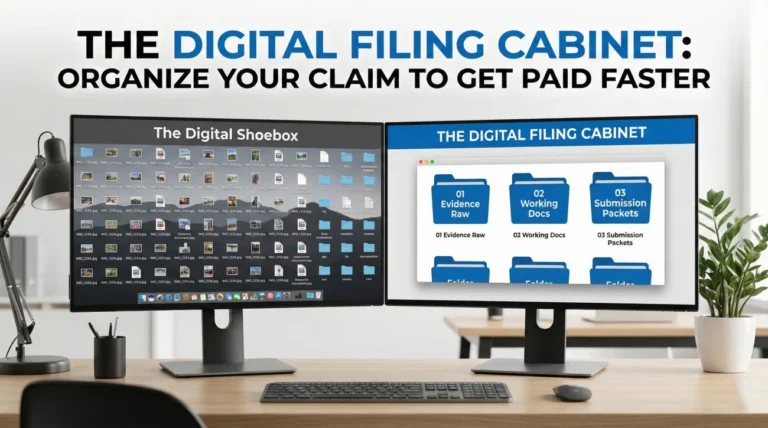
But when those files arrive on my screen, they rarely look the way you intended. Instead of a logical tour of your damaged home, I usually see a massive grid of files named “IMG_4921.JPG” and “IMG_4922.JPG.” Without context, a tight close-up of a water stain on a white ceiling looks identical in every single room of the house.
This guide breaks down a simple, manual system for labeling claim photos that I always recommend to policyholders. By renaming your files before you share them, you give the claims team a clean, readable map of your loss from day one.
How Software Destroys Your Timeline

To understand why file names matter so much, let me explain what happens on my screen after you click upload. As a desk adjuster, I do not simply look at your photos in a web browser. I typically download your entire batch of evidence as a compressed folder and drag those files directly into specialized estimating software to start writing your repair bid.
When files are imported in bulk, most of these systems automatically sort them alphabetically by their file name. If you took ten photos in the kitchen, walked to the living room for two photos, and then went back to the kitchen to take five more, your phone’s default chronological numbering (like IMG_01 to IMG_17) will completely mix those rooms together.
As a reviewer, I have to mentally untangle that mess. If I have to guess what room I am looking at, the review process naturally slows down. Leaving a reviewer to guess can easily stall your claim, as it often leads to clarification phone calls or overlooked damage.
Field Note: A pattern that frequently stalls out a perfectly valid claim is the “received but unverified” photo. I regularly review files where a homeowner uploaded dozens of photos of ruined personal belongings, but none of the files were labeled. Because I cannot prove which room those items were in at the time of the event, I cannot accurately apply the right depreciation rules or confirm the location. A simple descriptive file name often fixes this issue immediately.
A Real Case: The Kitchen Fire vs. The Flooded Basement
To show you how drastically file names affect your timeline, let me share two claims that landed on my desk in the same week. The contrast in how quickly they were processed came down entirely to how the photos were labeled.
The first file was a kitchen fire. The homeowner uploaded 150 photos directly from their phone. The files were simply named IMG_001.jpg through IMG_150.jpg. Because the fire and smoke had blackened the walls, the physical context of the rooms was destroyed. I spent two entire days just trying to figure out which photos belonged to the kitchen, the dining room, and the connecting hallway. Eventually, I had to pause the estimate and schedule a phone call to walk through the photos one by one with the homeowner. That simple naming issue delayed their initial check by almost a week.
The second file was a basement water damage claim. The policyholder uploaded 40 photos, but they took the time to rename them on their computer before uploading. The files were named “Basement_Stairs_WaterLine_01.jpg” and “Basement_MainRoom_Carpet_01.jpg.”
When I dragged that batch into my estimating software, the system automatically grouped the stairs, the main room, and the storage closet together based on the alphabetical file names. I wrote that entire estimate in 45 minutes, and it was approved the next morning. There were no phone calls and no guessing. The evidence spoke clearly for itself.
The 3-Part Naming Convention

You do not need any special apps or metadata software to organize your claim. You simply need to move your photos to a computer, open your file explorer, and rename them using a consistent format. The most practical format uses three distinct parts.
Format: [Room Name]_[Damage or Subject]_[Sequence Number]
Part 1: The Room Name
Always start the file name with the specific location. This is crucial because alphabetical sorting will automatically group all files starting with “Kitchen” together, regardless of when they were uploaded. Use clear, standard names like Kitchen, MasterBed, Hallway, or ExteriorFront.
Part 2: The Damage or Subject
The middle of the file name should briefly state what the photo is showing. Keep it neutral and factual. Words like “CeilingLeak”, “Baseboard”, “Overview”, or “RuinedSofa” tell me exactly what to focus on before I even open the image.
Part 3: The Sequence Number
The sequence number is the secret to maintaining your visual story. If you took three photos of the kitchen ceiling to show the path of a leak, you want the reviewer to see them in order. Always use a two-digit number (01, 02, 03) rather than a single digit (1, 2, 3). If you use single digits, computer systems will often sort photo “10” immediately after photo “1”, which disrupts your sequence.
File Names vs. Portal Captions
Many insurance portals have a feature that allows you to type a description or a “caption” under a photo after you upload it. While I always appreciate when a policyholder provides extra details, I never want you to rely on portal captions as your only method of labeling.
When an adjuster downloads your photos from the portal into a bulk zip file, those typed captions are often stripped away. Sometimes they are placed in a completely separate text document that is frustrating to cross-reference. The actual file name is the only label that is permanently attached to the image file itself.
It is good practice to type a descriptive caption in the portal if you have the time, but always rename the core file on your computer first. This ensures that no matter what software the adjuster uses, your context travels safely with the photo.
Time Versioning for Supplemental Photos
A property claim is not a single event. It is an evolving timeline. The photos you take on day one will look very different from the photos you take on day ten after a mitigation crew has torn out your wet drywall.
If you discover new damage a week later and simply name the new photo “Kitchen_Wall_01.jpg”, the system might flag it as a duplicate. Worse, it might sort it right next to your original day-one photo, causing deep confusion about the timeline of the damage.
To prevent this, I recommend introducing “versioning” into your file names when submitting supplemental evidence. You can do this by adding a phase indicator or a specific date to the end of the file name.
Day 1: LivingRoom_Floor_01.jpg
Day 5 (After Tear-out): LivingRoom_Floor_DemoPhase_01.jpg
Day 14 (Hidden Damage Found): LivingRoom_Subfloor_Oct14_01.jpg
By clearly marking the phase or the date in the file name, you are proactively answering the reviewer’s question about why the room looks totally different. This level of organization keeps your file moving smoothly through multiple review stages.
Bulk Renaming Without Special Tools
You might be wondering how to realistically rename 100 photos without spending your entire weekend at the keyboard. You do not need to buy any photo management software to do this efficiently. Both Windows and Mac computers have built-in bulk renaming features.
The easiest workflow is to create a folder for each room on your computer. Drag all the kitchen photos into the “Kitchen” folder. Then, select all the files in that folder, right-click, and choose the “Rename” option. Your computer will allow you to type a base name like “Kitchen_Damage” and it will automatically append sequential numbers to the end of every selected file.
While this is not as perfectly descriptive for every single photo, “Kitchen_Damage_01.jpg” through “Kitchen_Damage_20.jpg” is infinitely better than random letters and numbers. It guarantees that the reviewer will at least view all the kitchen evidence together in one sitting.
Common File Labeling Mistakes

Even organized policyholders can make minor technical errors when naming files. These mistakes can cause upload failures or create unnecessary bias in the claims file. Keep these rules in mind when preparing your evidence.
- ❌ Using special characters: Avoid using symbols like #, @, %, &, or / in your file names. Many older insurance portals and database systems cannot process these characters and will reject the upload entirely. Stick to letters, numbers, and underscores.
- ❌ Writing a novel in the file name: A file name is a label, not a paragraph. “Kitchen_Wall_01” is great. “Kitchen_Wall_Where_The_Pipe_Burst_And_Ruined_Everything_01” is too long and will likely get cut off by the software’s display limits.
- ❌ Using emotional language: Remember that these files become part of a permanent, auditable record. Keep the names neutral. Labeling a file “Terrible_Roof_Job_01” introduces emotion and bias. Labeling it “Roof_MissingShingles_01” keeps the focus squarely on the observable facts.
- ❌ Mixing formats: Try to convert modern phone image formats (like the .heic format from Apple devices) to standard .jpg files before uploading. While many insurers accept newer formats, standard .jpg files are universally readable and reduce the chance of a file error on the adjuster’s end.
Linking Labels to Your Master Index
Renaming your files is a powerful step, but it is just one part of a broader organizational strategy. Once your photos have clear, descriptive names, you can easily reference them in your written communication.
If you are submitting a written summary of your damaged personal property, you no longer have to vaguely describe an item. You can list “Leather Sofa” and confidently point the adjuster to “LivingRoom_RuinedSofa_01.jpg” as the proof. This method of cross-referencing is the foundation of a complete property claim evidence pack. It removes all the guesswork from the equation and presents your claim as a documented, irrefutable package.
Taking Control of the Narrative
I know that sitting at a computer and renaming dozens of photos feels like a tedious administrative chore, especially when you are dealing with the stress of a damaged home. It is completely normal to just want to upload everything directly from your phone and let the insurance company sort it out.
However, leaving the sorting to the insurance company means leaving the interpretation up to them as well. By using a simple room, subject, and sequence naming convention, you take control of the narrative. You tell the adjuster exactly what they are looking at and exactly where it belongs.
Taking this extra time protects your evidence from being misunderstood, miscategorized, or ignored. It is often one of the best ways to ensure your claim moves steadily toward a fair resolution with less back-and-forth communication.
❓ FAQ
📱 Can I just rename the photos directly on my phone?
While some modern smartphones allow you to rename files, it is usually much slower and more prone to errors than moving the batch to a computer and using a standard keyboard to type out the labels.
📂 Should I put the photos in separate folders before uploading?
Organizing photos into folders on your computer is a great habit for your own records. However, many insurance portals force you to upload files into one main queue, which is why the descriptive file name is so critical.
📸 Do I need to label every single photo if I took 300 of them?
You rarely need to submit 300 photos. Select the best 20 to 50 photos that clearly show the overview and specific damages, label those properly, and keep the rest safely backed up just in case.
🔍 What if I don’t know the exact name of the broken part?
Use a general, descriptive term based on what you can observe. Instead of guessing a complex plumbing term, simply label it “UnderSink_BrokenPipe_01”. The goal is location and context, not a perfect diagnosis.
🗓️ Should I include the date in every single file name?
It is usually not necessary for your initial day-one photos, as the metadata holds the capture date. However, adding a date is highly recommended when you submit new photos weeks later to show a timeline progression.
🤷♂️ What do I do if I already uploaded them without names?
If the portal allows you to add typed captions after upload, do that immediately. If not, you can create a simple written list (a photo index) that describes what is shown in the first, second, and third photos you uploaded.
🖼️ Is it better to send photos as a PDF document?
No. Adjusters usually prefer individual image files (.jpg) because they need to drag and drop them directly into their estimating software. A PDF locks the photos together and makes this difficult.
🔢 Why do you suggest using 01 instead of just 1?
Computers sort text character by character. If you use 1, 2, and 10, the computer often sorts 10 immediately after 1. Using a two-digit format like 01, 02, and 10 forces the system to keep them in perfect numerical order.
🛋️ How should I label photos of my damaged personal property?
Use a similar convention but focus on the item: “LivingRoom_Sofa_WaterDamage_01”. This helps tie the photo directly to the specific line item on your written contents inventory list.
💻 What happens if my file names are too long?
Some older upload portals have character limits and might cut off the end of a long file name, which deletes your sequence number. Try to keep your names concise and under 40 characters.
⚠️ Disclaimer: PropertyClaimChecklist.com provides practical guidance, process checklists, and example follow-ups to help you organize a property claim and move it forward. It is not policy language, claim documentation, legal content, or a substitute for your insurer's instructions. Always rely on your carrier's requirements and your actual policy terms for what must be submitted and how decisions are made.