- A claim consistency check is a self-audit you perform before submitting documents to ensure your dates, locations, and descriptions align perfectly across all files.
- Contradictions in evidence rarely indicate fraud, but they frequently trigger administrative delays because the reviewer cannot confidently map the damage.
- Reviewing your evidence helps clarify the record, making it easier for the desk adjuster to process your file without defaulting to formal requests for clarification.
- If you find a contradiction after submission, proactively submitting a corrected document with a neutral explanation is a reliable way to maintain the integrity of your file.
The Hidden Mismatches That Slow Down Reviewers
Gathering evidence for a property claim often feels like a race against the clock. You are busy taking hundreds of photos, tracking down old receipts, and collecting estimates from contractors. When you finally assemble all these files, the natural instinct is to send them to your adjuster immediately so the review process can begin.
However, submitting a large volume of evidence does not inherently speed up a claim. In fact, if those documents tell conflicting stories, a large submission can actually slow the process down to a crawl.
Watching hundreds of claims move through the system, I often see standard files sit in a holding pattern for weeks because of a single overlooked detail. For example, a plumber’s invoice listed the repair location as “Guest Bathroom,” while the homeowner’s photo index labeled the damage in the “Hallway Bathroom.” To a homeowner, those might be the exact same room. To an adjuster reviewing a file hundreds of miles away, it is a discrepancy that requires clarification before the reviewer can confidently write those line items into an estimate.
Key Point: Consistency is just as important as volume. A consistency check is a deliberate pause before submission to ensure your photos, logs, and contractor documents all agree on the basic facts of the timeline and scope.
Before you finalize your property claim evidence pack, you need to look at your documents the way an auditor does. Today, we will walk through the specific areas where contradictions hide and how to resolve them before they cause friction in your claim.
The Operational Reality of Evidence Review
To understand why a consistency check matters, it is helpful to look at how evidence is reviewed inside a modern insurance operation. Desk adjusters are not just glancing at your photos to see if things look broken. They are actively building a chronological and spatial map of the incident.
The Desk Review Mapping Process
When your files arrive, an adjuster cross-references your documents against the original First Notice of Loss (the initial report you made). They are looking for alignment across three main axes: time, location, and cause.
If the evidence aligns, the file may move smoothly to the estimation phase. If the evidence contradicts itself, the adjuster usually has to pause the review. This is not necessarily because they suspect you of doing something wrong. Often, it is because their internal Quality Assurance (QA) department will flag the file if they approve an estimate based on conflicting data.
⚠️ Warning: Adjusters are constrained by internal audit requirements. If a contractor’s estimate lists 500 square feet of drywall replacement, but your room measurements show the space is only 300 square feet, the adjuster cannot simply split the difference. They must stop the workflow and ask for clarification.
Why Reviewers Default to RFI Letters
Insurance companies rely heavily on data validation. While processes vary by carrier, when a mapping discrepancy is found, the file often drops out of fast-track workflows and enters a manual review queue. Here is what typically happens:
- 📄 The adjuster sends a formal Request for Information (RFI) letter.
- ⏱️ The internal review clock often pauses while they wait for your response.
- 🔍 The file may be flagged for a secondary review by a supervisor, as conflicting dates can sometimes trigger automated system flags, even if the mistake was an innocent typo.
By running a consistency check, you help lower the chance of your file being pulled into these slow, manual review cycles.
The One-Page Audit View: What Reviewers Map
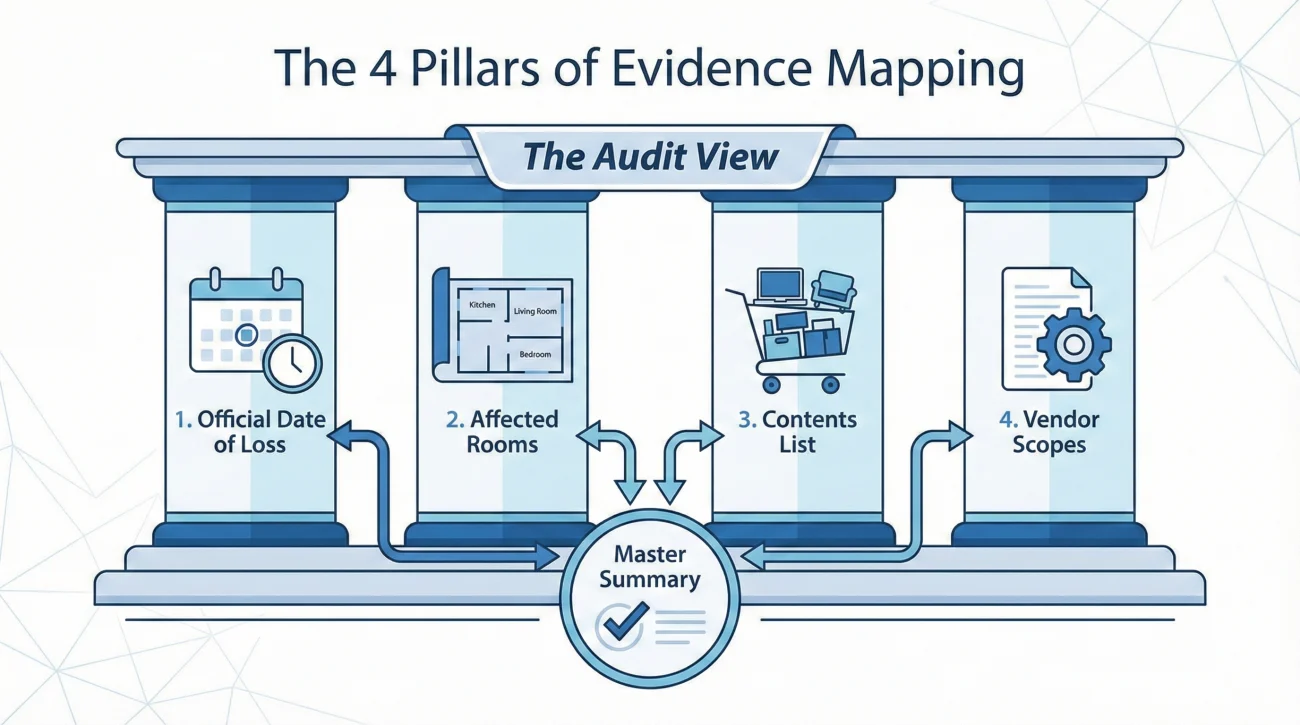
If you want to think like a claims operator, you have to understand the “One-Page Audit View.” When a reviewer opens your file, they are mentally (and sometimes literally) creating a master summary. They are looking for four specific pillars to align:
1. The Official Date of Loss (DoL): This is the anchor. Every receipt, photo timestamp, and contractor invoice must logically follow this date.
2. The Affected Rooms List: They build a standardized list of damaged areas. If you use varying names for the same space across different documents, their list breaks.
3. The Contents List: They map the items claimed against the proof of purchase provided.
4. The Vendor Documents: They map the scopes of work provided by mitigation crews or repair contractors back to the physical photos.
When any of these four pillars contradict each other, the mapping process fails, and the RFI letters are generated.
The Three Mismatch Categories and What They Cost
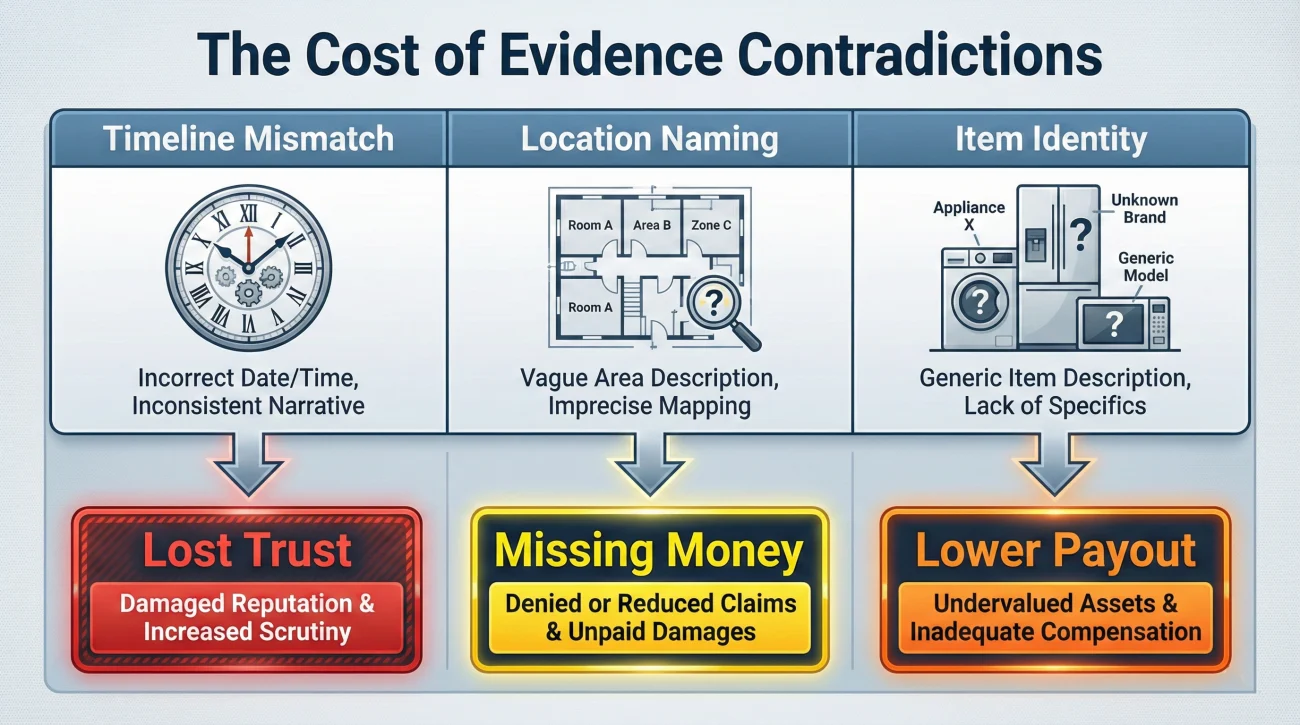
Not all contradictions are created equal. Different types of mismatches result in different types of operational friction. When a file stalls due to a document contradiction, it almost always falls into one of these three categories:
Timeline Mismatches Cost Trust: If a water mitigation invoice is dated a week before your official Date of Loss, it creates an immediate trust issue. It triggers questions about prior, unreported damage or delayed reporting. Even if it was just a clerical error by the contractor, a timeline mismatch forces the adjuster to investigate the history of the policy, which can stall a file for weeks.
Location Naming Mismatches Cost Money: If your photos show a damaged “Living Room” but your contractor’s estimate only includes repairs for a “Den,” the adjuster cannot confidently map the photo to the estimate. The result is often missing line items. The adjuster will only write an estimate for what they can definitively prove, meaning you might receive a lower initial payout simply due to inconsistent terminology.
Item Identity Mismatches Cost Contents Payouts: If your inventory spreadsheet claims a high-end 2023 appliance, but the receipt you attached shows a mid-range model from 2019, the reviewer stops. This mismatch often triggers heavy depreciation or an outright denial of that specific item until you can clarify the discrepancy. It makes the rest of your inventory list look less credible by association.
A Mini Case Study: The Contradictory Typo
To illustrate how easily a minor contradiction can stall a claim, consider a common scenario involving a burst pipe.
The homeowner discovered the leak on a Saturday morning (November 10th) and immediately called a plumber. The plumber fixed the pipe and handed the homeowner a handwritten invoice. On Monday (November 12th), the homeowner officially filed the claim, citing November 10th as the Date of Loss.
A week later, the homeowner uploaded the plumber’s invoice. However, the plumber had accidentally written “Oct 10” instead of “Nov 10” on the receipt. The homeowner did not notice this typo.
When the desk adjuster reviewed the file, they saw a Date of Loss of November 10th, but a repair invoice from exactly one month prior. The adjuster could not proceed. They had to issue a formal letter asking if this was a long-term, ongoing leak (which is often excluded from coverage) or if there had been two separate pipe bursts.
It took three weeks for the homeowner to get a revised invoice from the plumber and submit an explanation. A simple five-minute consistency check before uploading the document would have prevented the entire delay.
The Self-Audit Checklist
Before you attach a batch of evidence to an email or upload it to a portal, run through this quick self-audit framework. It usually takes less than fifteen minutes but provides significant clarity to your file.
| Checklist Item | What to Verify |
|---|---|
| 1. Date Alignment | Do all contractor invoices, mitigation logs, and estimates reflect dates that logically follow your official Date of Loss? |
| 2. Room Naming | Does the photo index, the contractor estimate, and your communication log use the exact same name for each affected area? |
| 3. Visual vs. Written | Does the written description match the photos? (e.g., if you claim the floor is ruined, do the photos show floor damage or just wall damage?) |
| 4. Inventory Matching | Do the receipts provided match the specific brands, models, and purchase years listed on your contents spreadsheet? |
| 5. File Labeling | Do the filenames of your PDFs and JPEGs match the descriptions you provided in your index and email body? |
💡 Pro Tip: If you find a contractor made a typo on an estimate or invoice, ask them to revise the document before you submit it. It is much easier for the contractor to fix their paperwork than it is for you to explain the error to the insurance company later.
Update Principles for Indices
When you perform a consistency check, you will inevitably find small errors. Perhaps you labeled a photo incorrectly, or you realize you missed a receipt. When you correct these errors on a previously submitted document, you must be careful not to create version control issues.
The principle is simple: never overwrite the old file blindly. Always save your document with a new version number (for example, changing Evidence_Index_v1.pdf to v2.pdf). When you submit the updated version, provide a one-sentence summary of what changed. This keeps the file history intact and prevents the adjuster from having to guess what is different between the two documents.
Handling Contradictions After Submission
Even with the best preparation, you might discover a contradiction weeks after you have already submitted the paperwork. Perhaps you realize you accidentally uploaded a receipt from 2018 instead of the one from 2023 for a damaged appliance.
The worst thing you can do is ignore it and hope the adjuster does not notice. If they find it first, it becomes a credibility issue. If you point it out first, it is simply an administrative correction.
If you discover an error, the best approach is proactive neutrality. You do not need to write a lengthy defense. Simply email the adjuster, neutrally state that you found an administrative filing error on your end, attach the correct document, and reference your updated index version. This frames the issue as a simple paperwork correction rather than a shifting story, reducing friction in the review process.
When Consistency is Perfect But the File Stalls
While a consistency check is a highly effective operational tool, it is important to recognize its limits. A clean file tends to move faster, but it is not immune to operational backlogs. Sometimes, a perfectly documented claim will still pause.
This often happens due to factors completely outside of your paperwork:
- 🌩️ Catastrophe Volume: After a major storm, adjusters are simply overloaded, and every file takes longer to reach the desk.
- 👷 Vendor Scheduling: The adjuster may be waiting on a third-party engineering report to confirm structural damage before they can proceed.
- 📖 Coverage Questions: Complex claims may require a manager to interpret specific policy language, which adds administrative time.
- 🏢 Internal Backlogs: Departments handling payment processing or final QA checks may be backed up.
In these scenarios, your consistency check still serves a vital purpose. It proves that the delay is not due to any inaction or confusion on your part, allowing you to focus your follow-ups on the actual operational bottleneck.
Final Thoughts on Evidence Integrity
Managing a property claim requires an attention to detail that can feel exhausting. However, taking the extra time to perform a consistency check is a high-return activity.
By ensuring your dates, locations, and descriptions align perfectly, you present a credible, organized file. You remove the ambiguities that trigger formal RFI letters, making it much easier for the insurance company to process your information and map your loss correctly.
❓ FAQ
🔍 How do adjusters check for evidence consistency?
Adjusters cross-reference the dates, locations, and descriptions across all your documents against the official Date of Loss to ensure the timeline and scope logically align.
📅 What happens if my receipt dates do not match the date of loss?
If a repair or mitigation invoice is dated before the official Date of Loss, it will likely pause the review process until you provide a written explanation or a corrected invoice from the contractor.
📸 Can insurance companies see when a photo was taken?
Yes. Digital photos contain metadata (EXIF data) that records the date and time the image was captured. Significant mismatches between this data and your reported timeline may prompt questions.
⏰ What if my phone’s photo timestamps are wrong?
If your camera clock was wrong or transferring the file altered the timestamp, simply add a note to your photo index stating the actual capture date to clarify the metadata artifact neutrally.
🛠️ What if my contractor wrote the wrong room name on the estimate?
Before submitting the estimate, it is best to ask the contractor to revise the document so that the room names match the exact naming convention you used in your photo index.
🚪 What if two rooms have the same name in different documents?
Using inconsistent names usually forces the reviewer to issue a Request for Information (RFI) to map the damage correctly, which temporarily pauses the estimation process.
📏 Why do my damage measurements need to match the photos?
Adjusters are audited on their estimates. If an estimate lists 500 square feet of repairs, but the photos clearly show a much smaller space, the adjuster cannot proceed without clarifying the scope.
📐 What if I used different units of measurement than my contractor?
While adjusters can convert basic units, mixing systems (like square feet versus linear feet for the same material) often requires manual review to verify the scope accurately.
📦 Does my inventory list have to match my receipts exactly?
Yes. The item description, brand, and purchase year on your inventory spreadsheet should closely align with the details on the receipt to avoid creating confusion during the contents review.
🏷️ How do I update my photo index if I find a contradiction?
Make the necessary corrections on your master document, save it as a new PDF version (like v2), and send it to the adjuster with a brief note explaining the update.
⚠️ Disclaimer: PropertyClaimChecklist.com provides practical guidance, process checklists, and example follow-ups to help you organize a property claim and move it forward. It is not policy language, claim documentation, legal content, or a substitute for your insurer's instructions. Always rely on your carrier's requirements and your actual policy terms for what must be submitted and how decisions are made.