- Your insurance claim file setup on day one determines how smoothly your entire process will go. Relying on memory or a single email inbox is a major cause of delays.
- Create exactly four folders to start: Intake Notes, Contacts, Appointments, and Requests. This prevents document scatter and keeps your facts straight.
- Log your claim number immediately, clarify the roles of everyone who calls you, and always ask for requirements in writing so you can file them correctly.
The Chaos of Day 1 and Why You Need a System
When property damage happens, the first twenty-four hours are usually a blur of adrenaline, phone calls, and immediate damage control. You call the 1-800 number to report the issue. The person on the phone gives you a claim number, tells you an adjuster will be in touch, and hangs up. In that exact moment, the administrative clock starts ticking.
In my experience handling claims operations, I have noticed a very specific pattern. The claims that get stuck in endless delays are rarely the ones with massive, complicated damage. They are the claims where the homeowner lost control of the paperwork on day one. They jotted the claim number on a sticky note that got thrown away. They saved the desk adjuster’s email somewhere in their primary inbox among hundreds of newsletters. When asked to provide a specific document three weeks later, they freeze because they have no idea what was already sent and what is still pending.
Key Point: Good claims operations do not rely on a good memory. They rely on a good system. Setting up a dedicated insurance claim intake file setup on the very first day is one of the best defenses against missing information.
You do not need a complex project management software. You do not need twenty different color-coded tabs. In fact, overcomplicating your file setup early on usually leads to abandoning the system entirely. You only need a simple, reliable place to put the exact facts you gather during the intake phase.
I am going to walk you through the four essential folders you need to create right now. Whether you build this digitally on your computer desktop or physically in a cardboard file box, the logic remains exactly the same.
Setting Up Your Intake File: The Core Four Folders
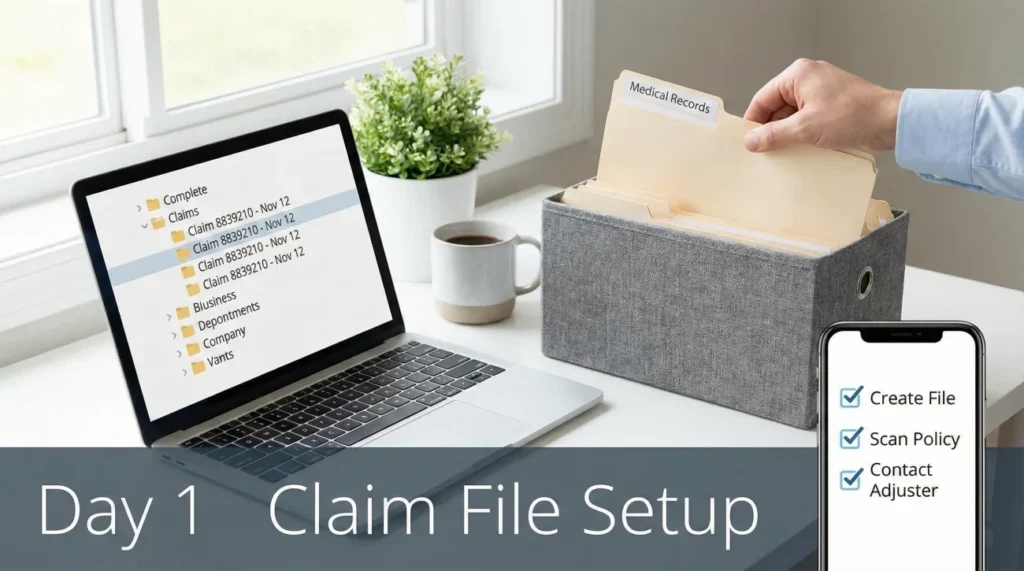
The goal of the intake stage is purely administrative hygiene. We are not yet building a massive argument or a detailed estimate. We are simply capturing the incoming facts cleanly. To do this, I recommend creating one master folder named with your Claim Number and the Date of Loss. Inside that master folder, create these four sub-folders.
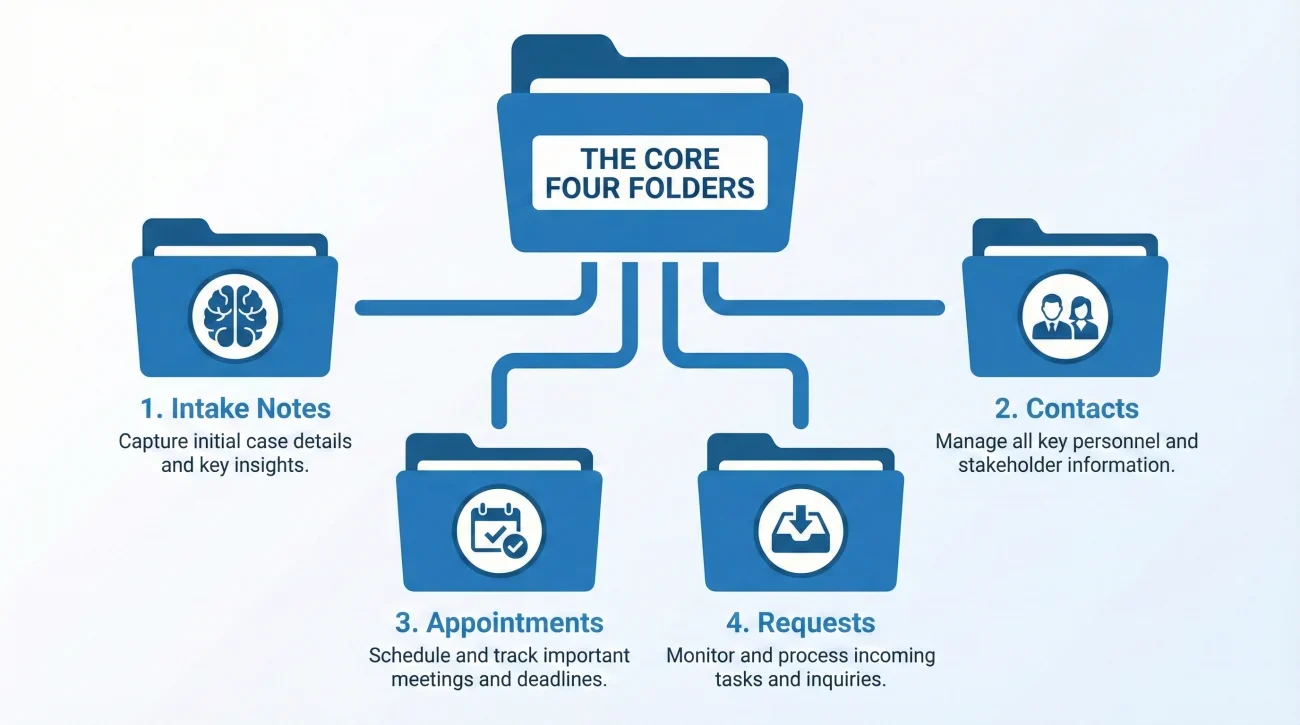
Folder 1: Intake Notes
This is the brain of your claim. Every single time you make a phone call to the carrier, or receive a call from them, a note goes into this folder. It is where you document the initial facts you provided during your First Notice of Loss (FNOL).
If you tell the first call center agent that the damage happened on Tuesday at 4:00 PM, that detail needs to live in this folder. Later, when an adjuster asks you to verify the timeline, you will reference your intake note to ensure your story remains completely consistent. Contradictions happen when people rely on their memory weeks after the event. Your intake notes folder prevents those contradictions.
Folder 2: Contacts
Within the first few days, you might speak to a call center representative, a local insurance agent, a desk adjuster, a field adjuster, and perhaps an emergency mitigation crew. It is incredibly common for property owners to confuse these roles.
For example, the desk adjuster works inside the carrier’s office and is typically the person who approves payments and manages the overall file. The field adjuster is the person who comes to your property to take photos and measure the damage, but they usually cannot write you a check or make final coverage decisions. The Contacts folder is where you clearly list who each person is, what their specific job title is, their direct phone extension, and their email address. If you do not know their exact role, this folder will remind you to ask.
Folder 3: Appointments
Your property will likely need to be inspected. Sometimes, multiple people need to inspect it. The Appointments folder is where you track who is coming to your property and when.
More importantly, this is where you keep notes on what happened during those visits. If the field adjuster shows up on Thursday morning, looks at the kitchen, but refuses to look at the basement, that goes into your appointment log. Keeping this separate from your general notes makes it very easy to prove attendance and inspection scope later on.
Folder 4: Requests
This is arguably the most critical folder for keeping the process moving. The Requests folder holds every single requirement the carrier asks of you. If they verbally tell you to send photos of the source of the leak, you ask them to email that request, and you save that email here.
When you fulfill a request, you track it here. If your claim stalls out on day thirty, you can open your Requests folder, verify that you have provided everything asked of you, and confidently follow up. Once your initial file is stable, you will eventually migrate your heavier documentation into a more comprehensive structure, like when you transition to building your formal proof of loss playbook.
The Intake Note Fields: What to Actually Write Down
Creating an Intake Notes folder is only helpful if you put the right data inside it. A blank piece of paper is intimidating. When you are on the phone reporting the claim, you need a structured way to capture the details. You do not need to transcribe the entire conversation, but you do need specific data points.
I always suggest creating a simple template document in your Intake Notes folder. Every time you have a conversation in the first few days, fill out these fields.
| Field Name | What to Record Here |
|---|---|
| Date and Time | The exact date and time the conversation took place. |
| Spoke With | The first and last name of the representative. |
| Role / Title | Are they an intake agent, a desk adjuster, or someone else? |
| Claim Number | Verify this on every single call to ensure you are in the right file. |
| Facts Provided | Briefly list the damage description you gave them (keep it observable and neutral). |
| Next Action Required | What did they say happens next? Who owes who an action? |
💡 Pro Tip: If the person on the phone gives you a fast string of instructions, do not panic. Ask them to pause, read your notes back to them, and confirm you have it right. It is much better to take an extra two minutes on day one than to spend two weeks untangling a misunderstanding later.
Real World Scenario: Putting the Day 1 Folders to Work
Let us look at what an organized intake process looks like in practice. Imagine you discover a major leak in your ceiling. You turn off the water, take a deep breath, and call your carrier.
First, you speak to the initial call center representative. They ask for the date the damage occurred and a brief description. You provide the facts carefully and clearly. They give you a claim number. Before hanging up, you create your master folder on your computer desktop named “Claim 8839210 – Nov 12”. Inside, you quickly create the four sub-folders.
You open your Intake Notes folder, create a new document, and log the time of the call, the representative’s name, and the claim number. You note that the representative said an adjuster would be assigned within 48 hours.
The next morning, you get a call from someone named Sarah. You open your Contacts folder. You ask Sarah, “Are you my desk adjuster or the field adjuster?” She clarifies she is the desk adjuster. You log her name, her role, her email, and her direct extension in your Contacts folder.
Sarah says a field adjuster will call you to schedule a visit, and she needs you to send over any emergency plumber invoices. You immediately go to your Requests folder and create a note: “Pending: Send plumber invoice to Sarah”.
You send the email with the invoice, but you do not mark the task complete yet. Two days later, you log into the carrier portal to check the status and see the invoice is completely missing due to a system glitch. Because you rely on your own folder system and not just their portal, you remain calm. You simply forward your original email to Sarah and ask her to manually confirm receipt.
Notice what happened here. There was no panic. There was no scrambling for a pen. Every piece of incoming information had a specific place to live. By the end of day two, your file is fully established, and you know exactly what your pending tasks are, even when their technology fails.
Communication Hygiene: Feeding Your Requests Folder

Your Requests folder is only as good as the information you put into it. One of the biggest operational gaps I see is homeowners accepting verbal lists of demands from an adjuster. A verbal request cannot be filed, it cannot be tracked accurately, and it cannot be easily referenced later.
If an adjuster calls you on day one and rattles off a list of five things they need you to do, you must transition that conversation into a written format. This is a boundary you have to set early.
Here is a practical script you can use while on the phone to pivot from verbal instructions to written documentation:
“I want to make sure I get you exactly what you need without missing anything. Could you please shoot me a quick email with a bulleted list of those requirements? I will save it in my file and start working on it right away.”
If they agree but the email never arrives, you must follow up. You need that written record for your system. Here is a neutral, copy-paste email script to send the next day:
Hello [Name],
Thank you for speaking with me yesterday regarding my claim. As discussed, please reply to this email with a written checklist of the documents, photos, or forms you need from me at this stage.
Once I receive the written list, I will review it and provide the items accordingly.
Thank you,
[Your Name]
Once they reply, that email gets saved directly into your Requests folder. Now you have a clear record of exactly what is expected of you.
The “Completed” Rule: Sent Does Not Mean Done
A major operational gap happens when people assume sending an email means the task is finished. In claims operations, a request is only completed when you have proof the carrier received it and attached it to your file.
If you email a document requested in your Requests folder, do not immediately check it off. Wait for a reply confirming receipt. If they do not reply within a few days, you follow up. The insurance carrier’s portal and your local files are two completely different things. A portal might crash, undergo maintenance, or lose data in a spam filter, but the principle of owning your own records is stable. Always hold onto your pending tasks until you get a confirmation that the file has been received and logged.
The “Silent Delay” Mistakes People Make by Day 3
Even with good intentions, people often slip up during the intake phase because the process feels overwhelming. Here are the common mistakes I routinely see that cause files to stall out early, and how to avoid them.
Relying on the portal for everything. Many carriers have online portals where you can upload documents and send messages. While useful, portals can sometimes hide old messages, or you might lose access if a technical issue occurs. Do not rely entirely on their system. Your insurance claim file setup on your own computer is your primary source of truth. Always keep a local copy of everything.
Uploading the plumber’s receipt to the portal and deleting the original file from your phone.
Saving the receipt to your Intake folder, keeping a copy, and then uploading it to the portal.
Lumping all contacts together. Storing every insurance contact simply as “Insurance Company” in your phone is a disaster waiting to happen. If you need to urgently ask about a temporary housing limit, you do not want to accidentally call the field adjuster who only handles structural measurements. Be highly specific in your Contacts folder.
Final: The 5-Minute Day 1 Setup Checklist
The first few days of a property claim often set the rhythm of the entire process. Instead of dwelling on the stress, take five minutes right now to build your system. This simple framework keeps your facts organized and prevents document scatter when the process gets complicated.
- ✅ Step 1: Create a master folder on your desktop named with your Claim Number and Date of Loss.
- ✅ Step 2: Create the four sub-folders (Intake Notes, Contacts, Appointments, and Requests).
- ✅ Step 3: Create a blank template document inside your Intake Notes folder for your initial call logs.
- ✅ Step 4: Start a Contacts list and immediately define the roles of anyone who has called you.
- ✅ Step 5: Turn on automatic cloud backup for this master folder.
❓ FAQ
📝 What is the very first thing I should write down when filing?
The claim number, the date and time you reported the loss, and the name of the representative who took your initial call. These three facts anchor your entire file.
📩 Should I save every single email from the insurance company?
Yes. Save every email as a PDF or move them into a dedicated folder in your email inbox. Even automated status updates are important because they create a timeline of how the carrier handled your file.
🗣️ Do I need to write down every single phone call I make?
Yes. Every call should be logged in your Intake Notes folder with the date, time, who you spoke to, and a brief summary of what was discussed. This prevents “he said, she said” arguments later.
🗓️ Where do I keep track of when the adjuster is coming?
Keep this in your Appointments folder. Include the scheduled date, the arrival window, the name of the adjuster, and any specific instructions they gave you regarding access to the property.
🤷♀️ What if I already lost some paperwork from the first day?
Do not panic. Simply send a polite email to your assigned desk adjuster asking them for a current status update and a written list of any outstanding documents they are waiting on from you to complete the file.
📎 How should I name my claim files so I do not lose them?
Always include your claim number in the main folder name. For individual documents, use clear, descriptive names with dates, such as “Plumber_Invoice_Nov12.pdf” rather than random image numbers.
🤔 Why do I need a Contacts folder if I have their emails?
Because roles get confusing. An email signature might just say “Adjuster,” but you need to know if they are a desk adjuster managing the file or a field adjuster just taking photos. Logging their specific role saves you from sending documents to the wrong person.
🔐 What if I am locked out of the portal?
Your local intake folders are your backup. If you are locked out, simply call your desk adjuster and ask them to email you a status update while IT fixes your access.
📲 What if the carrier keeps calling but never emails requests?
Send a follow-up email yourself after every call summarizing what they asked for. Simply say, “Confirming our call today where you requested these items. I will send them shortly.”
🧠 What if family members are also talking to the insurer?
Designate one primary point of contact for the claim. If someone else must speak to the carrier, they must log their notes in the shared Intake Notes folder to prevent contradictory facts from being recorded.
⚠️ Disclaimer: PropertyClaimChecklist.com provides practical guidance, process checklists, and example follow-ups to help you organize a property claim and move it forward. It is not policy language, claim documentation, legal content, or a substitute for your insurer's instructions. Always rely on your carrier's requirements and your actual policy terms for what must be submitted and how decisions are made.