- When an adjuster asks for documents you have already sent, it is rarely an intentional delay tactic; it is usually an administrative glitch, a desk handoff, or a file naming issue.
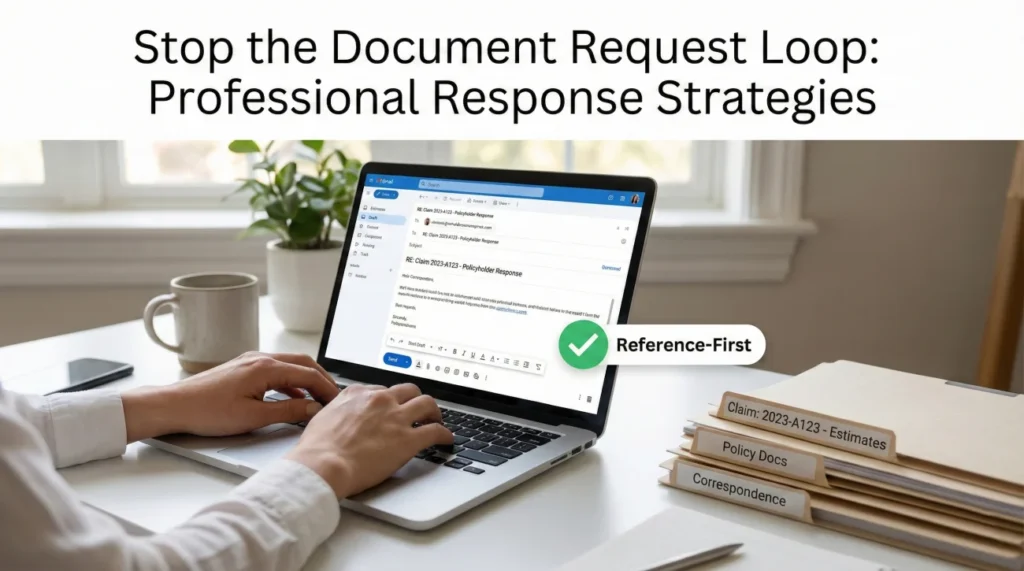
- Do not simply forward the old email. Use a “Reference-First” response protocol to point out the exact date, time, and method of your original submission.
- Attach a simple, one-page Claim Document Index to map out what you have provided and prevent future confusion.
- If you must resend the files, bundle them cleanly with clear file names and include proof of your previous submission to create a permanent administrative record.
- Always establish a written confirmation loop moving forward so you are never left guessing if a file was successfully attached to your claim.
The Frustration of the Document Request Cycle
You spent hours gathering your receipts, organizing your photos, and uploading everything to the portal. A week goes by, and you receive an email from your adjuster asking for the exact same paperwork. It is incredibly frustrating. It feels like your file is moving backward.
I have spent years managing and observing claim operations, tracking how files move from a claimant’s outbox to an adjuster’s desk. When a desk adjuster keeps asking for the same documents, the instinct is often to assume they are stalling the claim. But in day-to-day claims operations, the reality is usually much more mundane. The files are often caught in an administrative blind spot.
Instead of getting angry or simply hitting “forward” on an old email, you need a protocol. You need a way to politely but firmly show that you have already done the work, while giving the adjuster exactly what they need to move the file forward. This guide will walk you through the reference-first response steps, how to organize your proof, and how to break the resubmission loop for good.
Why Your Adjuster Cannot See What You Sent
To respond effectively, it helps to understand what is happening behind the scenes. When your primary keyword in communication becomes “I already sent that,” you are usually dealing with one of a few common operational bottlenecks.
First, consider the desk handoff. It is very common for a claim to be passed from a first-notice representative, to a field adjuster, and then to an inside desk adjuster. If the previous handler saved your documents to a local folder instead of the central claim system, the new adjuster literally cannot see them. They are looking at a blank screen.
I recently reviewed a claim where a field adjuster saved a structural estimate locally instead of uploading it. When the inside desk adjuster took over, they naturally asked the homeowner for the estimate again because their screen was empty. Instead of arguing, the homeowner used the reference-first approach and attached a document index. The new adjuster found their bearings immediately and processed the next step that afternoon. While the exact software process varies by carrier and system, assuming an administrative gap rather than a delay tactic is usually the safest bet.
Second, portal ingestion failures are a common reality. You might see a green checkmark indicating your upload was successful, but if the file size was slightly too large, or if the system timed out during transfer, the document may not attach to the adjuster’s specific interface.
Key Point: Do not assume malice when administrative error is the most likely culprit. Treat a repeated request as a clerical disconnect, not a personal attack. This keeps the tone of your claim professional and focused on progress.
Finally, there is the issue of file naming. If you scan 20 pages of receipts and email them as “Document_001.pdf,” the adjuster has to open it, read it, and manually relabel it in their system. If they are handling 80 claims, generic file names may get miscategorized or buried under other correspondence. They ask for the document again because they cannot find it in their own unorganized digital pile.
The Reference-First Response Protocol
When you receive a duplicate request, the worst thing you can do is silently resend the document. Doing so teaches the administrative system that you are willing to repeat work without establishing a timeline. If you keep silently resending, it may shift the administrative record of your claim to today’s date, rather than the date you originally submitted the paperwork.
Instead, use the Reference-First Protocol. This means your response should lead with the facts of your original submission before providing the files again.
“Here are the contractor estimates you asked for. Please review them.”
“I am following up on your request for the contractor estimates. These were originally uploaded to the portal on October 12th at 2:00 PM. For your convenience, I have attached them to this email again.”
Steps to Execute the Protocol
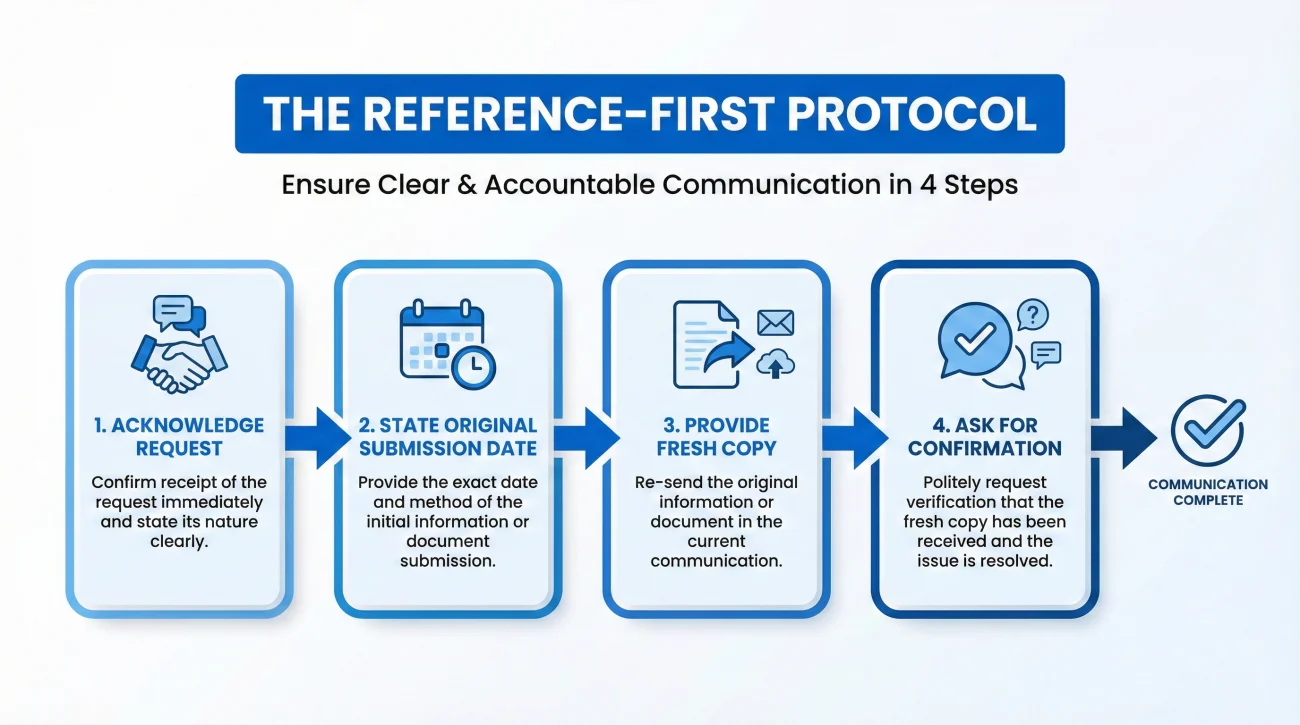
When building your response, follow this specific order to keep the record clean and professional:
1. Acknowledge the request: Start by confirming exactly what they asked for. This shows you are paying attention and cooperating.
2. State the original submission date: Clearly list the date, time, and method (email, portal, or certified mail) of your first submission. This protects your timeline.
3. Provide a fresh copy: Do not just tell them to go look for it. Always provide a fresh, clearly named copy attached to your current message. Your goal is to make their job as easy as possible so your file gets processed.
4. Ask for a confirmation loop: End your message by asking them to confirm in writing that the file is now accessible in their system.
Scripts: How to Respond Without Starting Over
Writing these responses can feel exhausting when you are managing a stressful property situation. Keeping your tone calm, neutral, and highly organized is the best way to get a desk adjuster to prioritize your file.
Here are two examples of how to frame your response depending on how the initial request was made. You can adjust the details to fit your specific situation.
Script for Email Replies
Hello [Adjuster Name],
I received your email requesting the [Name of Document, e.g., plumber’s invoice].
For your records, this document was originally sent via [email / uploaded to the portal] on [Date] at [Time]. It appears it may not have routed to your desk correctly.
To ensure you have everything you need today, I have attached a fresh copy to this email. The file is named “123456_Plumber_Invoice_Oct12.pdf”.
Could you please reply to confirm that you can open this attachment and that it has been added to my main file?
Thank you for your help,
[Your Name]
Notice that the script does not contain any accusations. It offers a graceful exit (“it may not have routed to your desk correctly”) while firmly establishing that you did your part on time.
If you are communicating entirely through an online portal, your message should be slightly shorter but follow the exact same logic.
[Acknowledge request] + [State past submission details] + [Provide fresh file] + [Request written confirmation]
Attaching a Claim Document Index
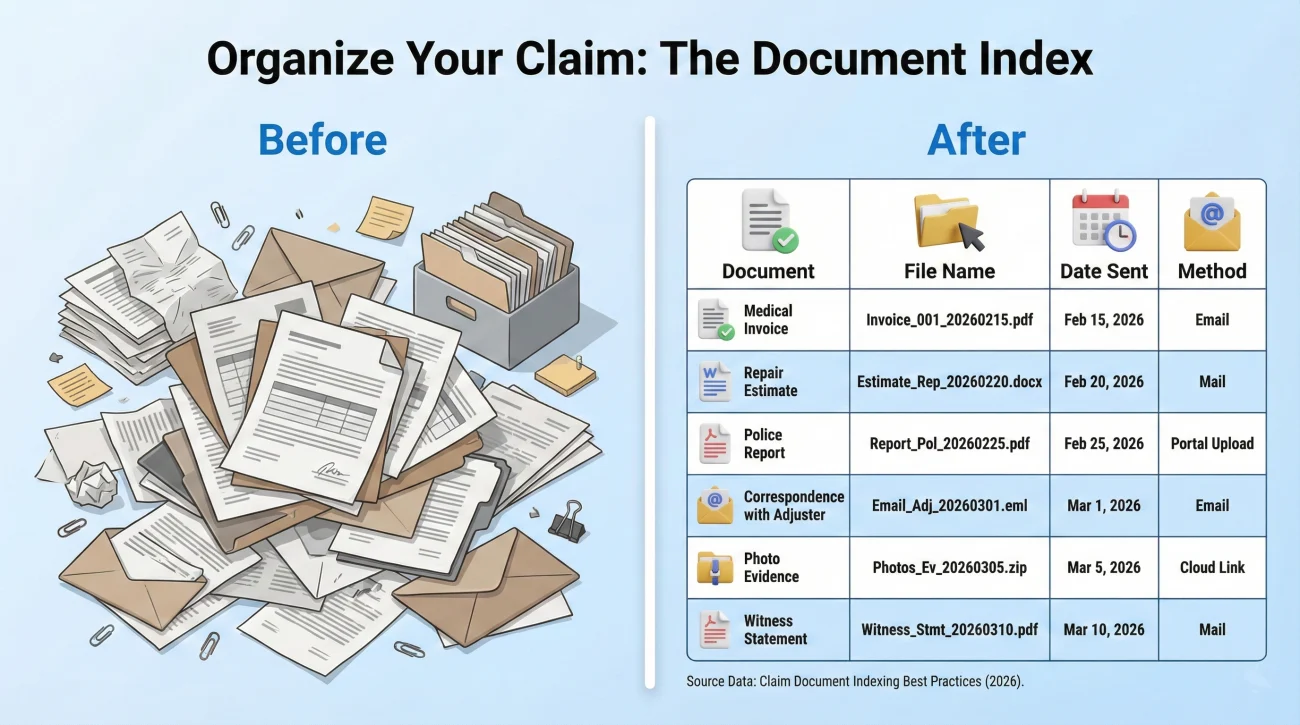
If your claim involves severe damage, you are likely dealing with dozens of files: photos, estimates, inventories, and receipts. When an adjuster asks for the same documents repeatedly in a complex claim, it is time to introduce a Claim Document Index.
A Document Index is simply a one-page cover sheet that lists every file you have submitted. Think of it as a table of contents for your claim. I have seen countless files stall because the adjuster simply lost track of what was sent. Providing an index takes the guesswork out of their job.
💡 Pro Tip: Create your index in a standard spreadsheet or word document, save it as a PDF, and attach it to the front of any major communication. Update the “Date Sent” column every time you submit something new.
| Document Description | File Name | Date Submitted | Method |
|---|---|---|---|
| Master Contents Inventory | Contents_List_Final.pdf | Oct 10, 2023 | Portal Upload |
| Kitchen Damage Photos (1-15) | Kitchen_Photos_Batch1.zip | Oct 10, 2023 | Portal Upload |
| Emergency Mitigation Invoice | Water_Dryout_Invoice.pdf | Oct 14, 2023 | Email Attachment |
If your claim is relatively small, you do not need a massive spreadsheet. A “Minimum Index” works perfectly. Just list 4 or 5 lines: your contractor estimate, the mitigation invoice, your main batch of photos, and a brief correspondence log. This proves you are organized without creating a heavy administrative burden for yourself.
When you reply to the repeated request, you can say: “I have attached the requested invoice, along with my current Document Index, which outlines the dates of all my submissions to date.” This level of organization signals that you are tracking the file closely, which naturally reduces sloppy administrative errors on their end.
Attaching Proof of Previous Submission
In most cases, the polite Reference-First email is enough to solve the problem. However, if the adjuster repeatedly claims they never received items that you know you sent, you may need to escalate your documentation habits by providing proof of submission.
Here is a common scenario I see: A homeowner uploads a heavy PDF of structural estimates to the portal. The adjuster says it is not there. The homeowner uploads it again. The adjuster still says it is missing. This is a technical failure loop.
To break this, you must attach evidence that your system shows the file as submitted. Instead of getting bogged down in technical steps, simply keep a clear, dated screenshot of your “Sent” email folder showing the visible attachments, or capture the portal’s confirmation screen. Bundle this image along with the requested document in your reply to create a permanent record of the system failure.
You can frame this gently: “I have attached the document again here. I also included a screenshot of my portal history from Tuesday, as it looks like my uploads might be showing up on my end but not syncing to yours. Could you check if there is an IT issue blocking my files?”
Common Mistakes When Caught in the Request Loop
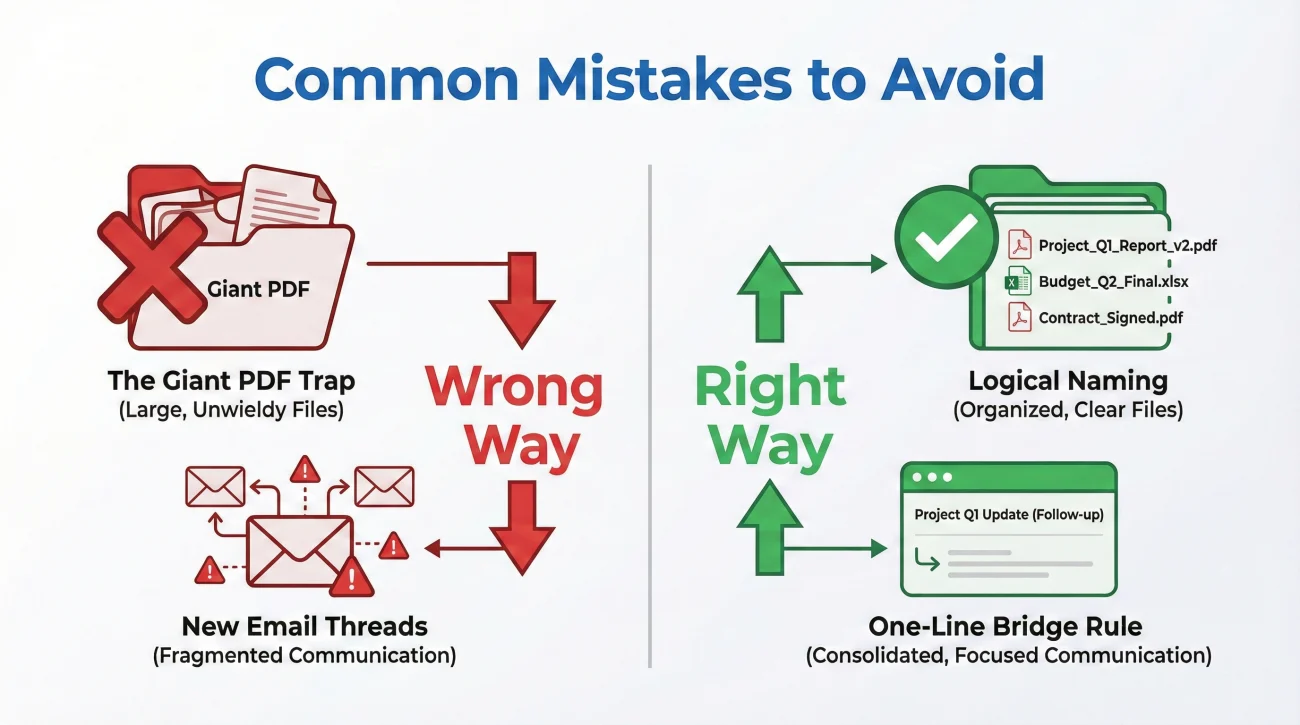
When you are frustrated, it is easy to make administrative errors that accidentally justify the delay. Avoid these common mistakes when dealing with repetitive requests:
The “Giant PDF” trap: A frequent pattern I notice is claimants combining 40 pages of unrelated documents (receipts, photos, estimates) into one massive PDF. When the adjuster needs one specific receipt, they may miss it entirely within the huge file and ask for it again. Always split your documents logically and name them clearly.
❌ Note: Never send a file named “Scan0001.pdf” or “IMG_9923.jpg”. Always rename files before sending so the adjuster knows exactly what it is without having to open it.
Using multiple email threads: Do not start a brand new email chain every time you send a document. You must reply to the main thread with your adjuster so the history stays intact. However, apply the One-Line Bridge Rule: Stay in the same thread for continuity, but do not just hit “forward” on an old message. Reply in the thread, but rewrite your message using the reference-first facts and attach fresh copies of the files.
Arguing over the phone: Calling the adjuster to argue that you already sent the document feels satisfying, but it leaves no administrative trail. If you must call them to clear up the confusion, you still need to follow up with a written email summarizing the call and re-attaching the file.
Establishing a Written Confirmation Loop
The ultimate defense against repeated requests is a proactive confirmation loop. You should never assume a document is safely in your file just because you hit send.
Every time you submit critical paperwork, explicitly ask for confirmation. It is much easier to fix a missing document issue on Day 2 than to discover it on Day 30 when you are wondering why your check has not arrived.
If you want to understand exactly how to build a complete, trackable system for all your claim files, I highly recommend reviewing our complete property insurance claim documents checklist. It outlines how to organize your files from day one so these request loops never have a chance to start.
To establish the loop, make it a habit to add this sentence to the end of every submission: “Please reply to confirm receipt of these [Number] attachments so I can update my claim log.” If they do not reply within 1-2 business days, follow up on the confirmation, not just the document.
Final Thoughts on Managing Paperwork Requests
Dealing with a property claim is largely an exercise in project management. When an adjuster asks for the same document twice, it is usually a signal that their internal system is messy, not that they are actively trying to deny your claim.
By stepping into the role of a calm project manager, you can guide the file to completion. Using the reference-first response, maintaining a simple document index, and securing written confirmations are boring administrative habits, but they are exactly what you need to reduce back-and-forth delays and keep your claim moving forward.
❓ FAQ
🔄 Why does my adjuster keep asking for the same documents?
It is usually an administrative issue. The file may have been transferred to a new desk, there could have been a glitch in the upload portal, or the previous file name was unclear, causing it to get lost in their system.
📁 Should I just resend everything if the adjuster asks again?
Yes, you should provide the documents again to keep the claim moving, but always state the date and method of your original submission in your reply to protect your timeline.
⏱️ Can an insurance company delay my claim by asking for more documents?
Repeated requests can reset the clock on their processing deadlines. This is why it is critical to use a reference-first response and establish a paper trail showing you already complied with their earlier requests.
📸 How do I prove I already sent my claim documents?
Take screenshots of your sent email folder showing the attachments, or capture a screenshot of the portal confirmation page showing the successful upload date and time.
📝 What is a document index and how do I use it for my claim?
A document index is a simple one-page list of every file you have submitted, including the date sent and file name. Attaching this to your emails helps the adjuster cross-reference what they have against what you sent.
✉️ How do I politely tell an adjuster I already sent that?
Keep it factual. Say: “I originally submitted this on [Date] via [Method]. In case it did not route to your desk correctly, I have attached a fresh copy for your convenience.”
💻 What happens if the portal doesn’t show the documents I uploaded?
Portals frequently experience syncing errors. If this happens, email the adjuster directly with the files attached and a screenshot showing your attempt to use the portal.
🏷️ Does file naming really matter for claim documents?
Yes. Adjusters handle dozens of claims. If you send a file named “Scan1.pdf”, they might overlook it. Renaming it to “Smith_Plumbing_Invoice_Oct12.pdf” prevents it from being misplaced.
📞 Should I call my adjuster to explain I already sent the paperwork?
You can call to clear up confusion, but phone calls do not leave an administrative trail. Always follow up the call with an email confirming what was discussed and re-attaching the document.
🛑 How do I stop the endless cycle of document requests?
Force a confirmation loop. Every time you send a file, end your message by asking them to reply and confirm in writing that the document has been successfully attached to your master file.
⚠️ Disclaimer: PropertyClaimChecklist.com provides practical guidance, process checklists, and example follow-ups to help you organize a property claim and move it forward. It is not policy language, claim documentation, legal content, or a substitute for your insurer's instructions. Always rely on your carrier's requirements and your actual policy terms for what must be submitted and how decisions are made.