
- The final check you receive is rarely the top-line number on your estimate; it is the result of a specific sequence of deductions that often vary by policy.
- Insurance payments commonly follow a standard calculation flow: Replacement Cost Value (RCV) minus Depreciation, minus your Deductible, equaling the Actual Cash Value (ACV) net payment.
- Understanding the glossary of terms on your estimate summary page is critical to verifying that the carrier applied your deductible correctly based on your specific occurrence.
- If you find a potential operational error in the calculation flow, a structured communication loop is a best practice to request a correction without escalating to legal arguments.
The Reality Behind the First Claim Check
You have just received the estimate for your property damage. It is a dense, multi-page document filled with construction line items, software codes, and room dimensions. You flip to the very last page, expecting to see a clear, straightforward payout number. Instead, you see a confusing block of math: subtractions for depreciation, a line item for a deductible, and a “net claim” amount that is lower than the total cost of your necessary repairs.
In my experience handling claims operations, this specific moment is when the communication between a homeowner and an adjuster frequently breaks down. It is not uncommon for a homeowner to look at the first check, compare it to their contractor’s bid, and feel as though the claim has been partially denied. The adjuster, however, typically views this as a standard automated flow within their estimating software. They aren’t necessarily making a judgment call; they are following a programmed sequence.
I often see homeowners respond with high-stress emails demanding immediate funds. In many cases, this leads to a standoff where the adjuster simply refers back to the summary page without explaining the “why” behind the numbers. The reality is that the gap between the total repair cost and your first check is usually a built-in operational mechanism—a way for the carrier to manage the payout process as work progresses.
Key Point: In most standard RCV policies, your first insurance check is an Actual Cash Value (ACV) payment. It represents the value of your damaged property today, accounting for its age, minus your deductible. This is often the starting point of the payment flow, not the final total.
To navigate this effectively, you need to understand how these payments are calculated conceptually. You do not need to be a math expert. You just need to recognize the basic operational sequence so you can read your summary page, spot potential data entry errors, and track the funds that are being held back. I am going to walk you through how these estimates turn into checks, the specific glossary items to look for, and the verification steps I recommend taking before you move forward.
The Conceptual Payment Calculation Flow
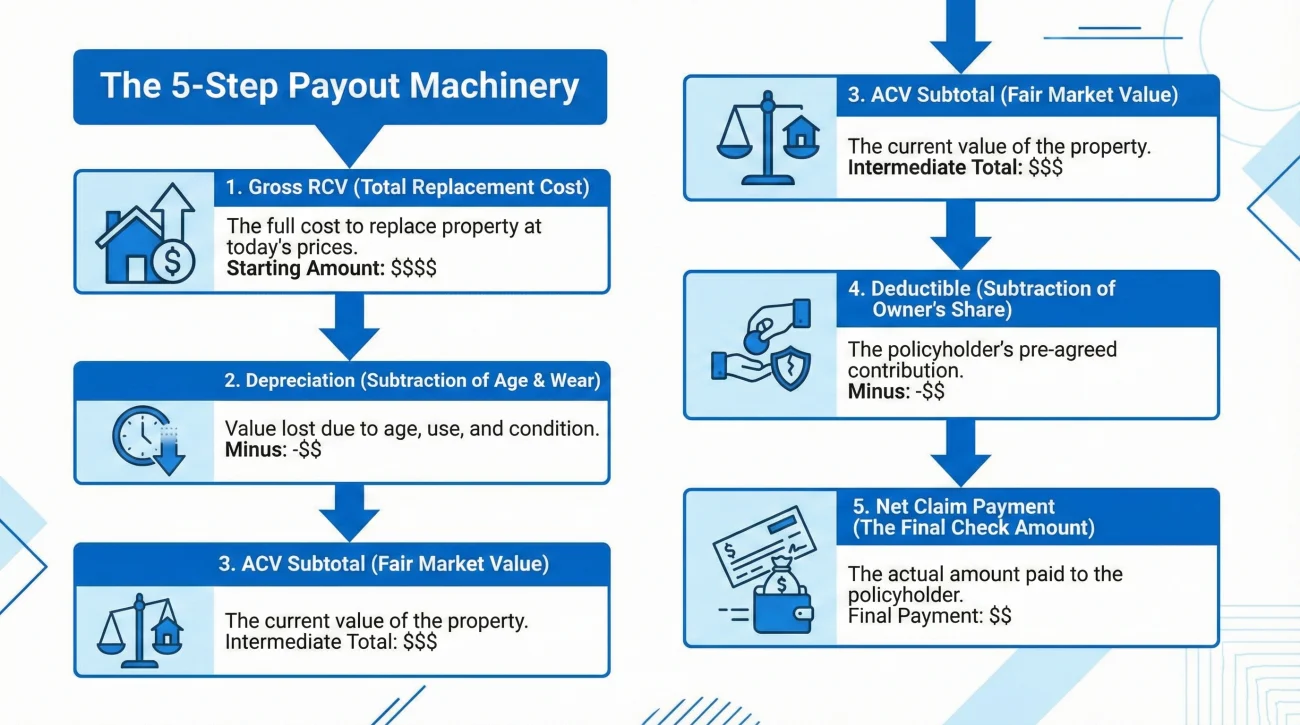
Insurance estimating platforms, such as Xactimate or Symbility, are standardized across the industry. While individual carrier layouts might vary, the underlying mathematical sequence is quite consistent. Recognizing this sequence is the key to auditing your payment breakdown.
Here is the standard flow of how an estimate becomes a net payment:
Step 1: Establishing the Replacement Cost Value (RCV)
The calculation starts with the gross total. The software tallies every line item: materials, labor, taxes, and any applicable overhead and profit. This sum represents the total estimated cost to replace the damaged property with brand-new materials at today’s rates. This is your Replacement Cost Value.
Step 2: Calculating and Subtracting Depreciation
Carriers typically do not pay for brand-new materials upfront if the damaged items were old. The software applies a depreciation percentage based on the age and prior condition of the items. This value is subtracted from the RCV. Operationally, this acts as an incentive: the carrier holds these funds until you prove the repairs are finished.
Step 3: Determining the Actual Cash Value (ACV)
Once depreciation is removed from the RCV, the result is the Actual Cash Value. This represents the “fair market value” of the property at the moment of the loss. It is a critical subtotal in the payout machinery.
Step 4: Applying the Deductible
Your deductible is your pre-agreed financial share of the loss. In the calculation flow, the deductible is subtracted from the Actual Cash Value. This is a common point of confusion—the insurance company does not send you a bill for the deductible; they simply withhold it from the payment.
Step 5: The Net Claim Payment
The remaining balance after the deductible is subtracted is your Net Claim. This is the amount authorized for release to you right now.
Assuming the total estimated repair cost is the exact amount of the first check and feeling the claim is being unfairly reduced.
Recognizing the first check is a result of a sequence (RCV minus Depreciation, minus Deductible) and tracking what funds remain to be recovered.
ACV vs. RCV Policies: Managing Holdback Expectations
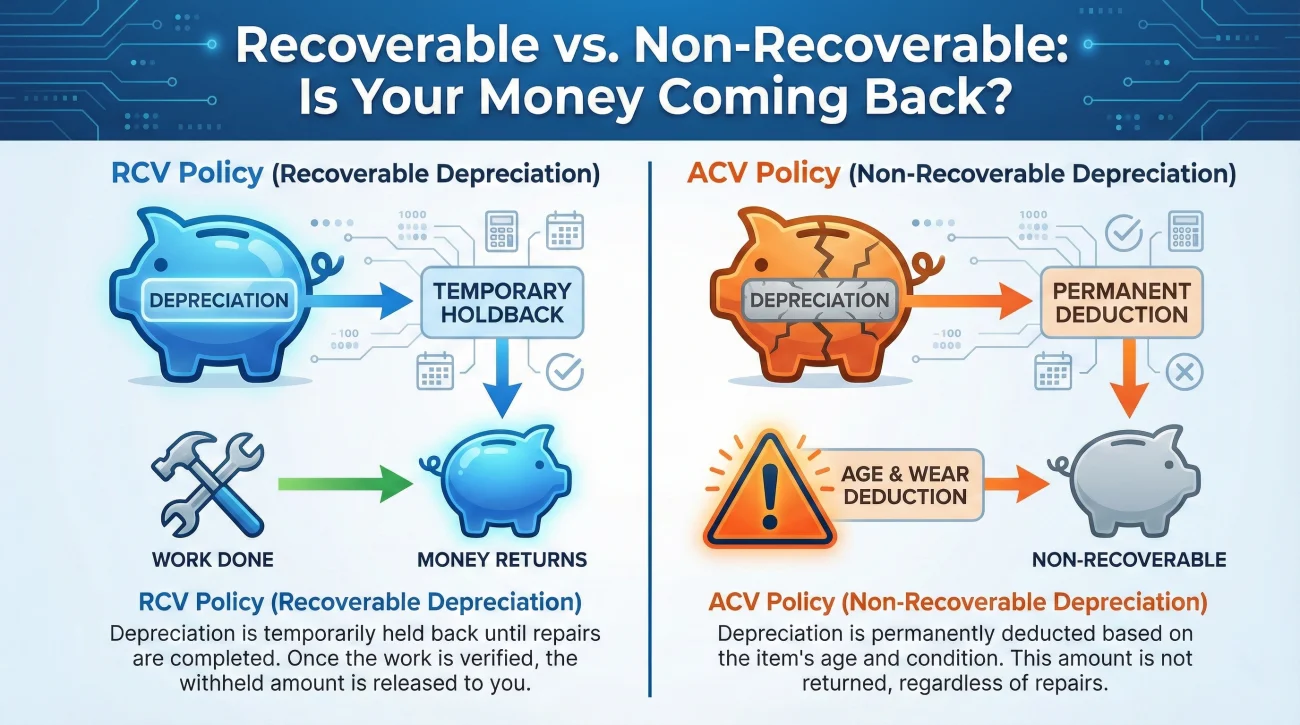
In my time in claims operations, I have seen many people search for “missing money” only to find that their policy doesn’t allow for it to be recovered. It is vital to know which policy type is being applied to your calculation flow.
Replacement Cost Value (RCV) Policy: This is the most common type. It allows you to recover the depreciation (the holdback) once you provide proof of completion. The “gap” in your first check is temporary.
Actual Cash Value (ACV) Policy: Some policies, or specific endorsements for items like older roofs, are ACV-only. In this case, the depreciation subtracted in Step 2 is “non-recoverable.” It is a permanent deduction. If your policy is ACV-only, the first check you receive is likely the only check you will receive for that specific damage, regardless of whether you finish the repairs.
💡 Pro Tip: Always look at the depreciation column on your summary. If it is labeled as “Non-Recoverable,” check your policy declarations. Labeling varies by carrier; sometimes it appears simply as “ACV Policy” at the top of the page.
Operational Glossary and Tracking Ledger
To audit your claim, you need to use the language the adjuster uses. This keeps the conversation focused on the data rather than emotions. Below is a breakdown of the terms and a simple ledger to help you track the money.
| Line Item | Operational Meaning | What You Verify |
|---|---|---|
| Gross RCV | Total agreed cost of all repairs. | Does this match the full scope of your contractor? |
| Recoverable Depreciation | Funds held back until work is done. | Is this marked as recoverable in the software? |
| Non-Recoverable Dep. | Permanent deduction for age/wear. | Does your policy specifically require this? |
| Deductible | Your out-of-pocket share. | Does this match your policy exactly? |
| Net Payment | The actual check amount issued. | Does it match your bank deposit to the penny? |
The Payment Tracking Ledger
I recommend keeping a simple five-line ledger in your claim folder. This prevents the “black box” feeling where you lose track of which funds have been paid and which are still owed. Update this every time you receive a new estimate revision or check.
2. Total Recoverable Depreciation (Holdback): [Number to be recovered later]
3. Non-Recoverable Depreciation (if any): [Permanent Deduction]
4. Policy Deductible: [Amount subtracted from payout]
5. Net Payments Received to Date: [Total of all checks/EFTs]
Field Notes: Common Calculation Errors
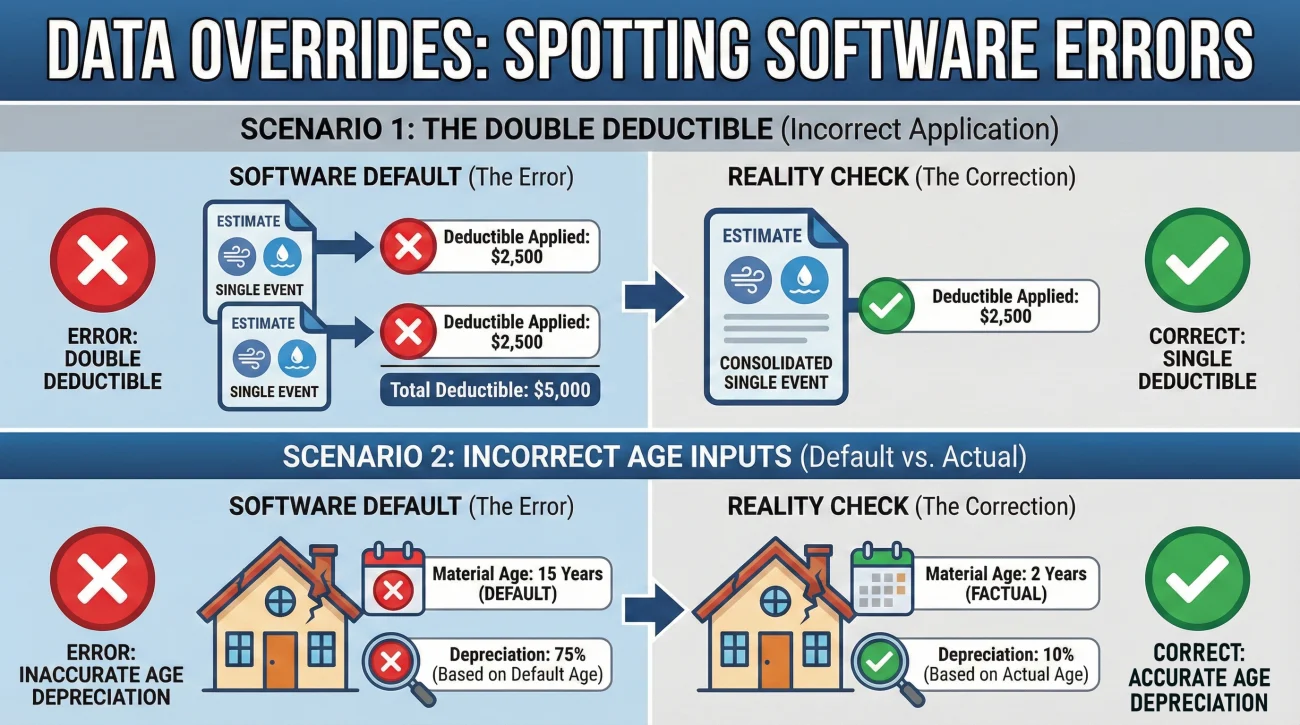
Experience shows that errors in the calculation flow are not uncommon. Adjusters process a high volume of files, and software defaults can sometimes override the actual facts of your claim.
Case Study 1: The Double Deductible
I once assisted with a file where a homeowner had damage to their main house and a detached shed from the same storm. The software automatically generated two separate estimate summaries. Because of a data entry oversight, the full deductible was subtracted on the house estimate, and *another* full deductible was subtracted on the shed estimate. By tracing the “Less Deductible” line on both summaries, we identified that the carrier had accidentally charged the homeowner twice for a single occurrence. A simple, neutral email pointing this out resulted in a supplemental check for the second deductible amount within days.
Case Study 2: Incorrect Age Inputs
Another common pattern involves the age of materials. Imagine a homeowner, Marcus, who installed brand-new cabinets just two years ago. The adjuster’s software might default to a “15-year life span” and apply heavy depreciation. If Marcus doesn’t check the “Age/Condition” input in the line items, he will see a massive, unnecessary holdback in his first check. By identifying that the input was wrong—not the math itself—he can ask the adjuster to update the age of the cabinets, which reduces the depreciation and increases his initial payout.
Best Practices for Verifying Your Breakdown
Before you accept the payment summary, I recommend a deliberate review of the numbers. You aren’t looking for a legal argument; you are looking for data consistency.
Review the summary page and verify these specific operational points:
- 📄 Deductible Accuracy: Does the amount subtracted match your declarations page? Don’t assume the software pulled the right percentage or flat-rate number.
- ✅ Single Occurrence Check: If you have multiple estimates (e.g., Dwelling and Other Structures), verify that the deductible appears only once across all documents.
- 📄 Recoverability Audit: Look at the depreciation column. Is everything you expect to be recoverable actually marked that way? Identifying “non-recoverable” errors early is much easier than fixing them after the file is closed.
- ✅ Age/Condition Inputs: Skim the line items. If you have recently replaced a roof or flooring, ensure the “Age” column reflects that. Older ages lead to higher holdbacks.
- 📄 Matching the Payout: Confirm the physical check or transfer matches the “Net Claim” line exactly. If there is a discrepancy, there may be an internal banking delay or a split payment you haven’t seen yet.
If you identify a discrepancy, the most effective route is to flag it immediately. Waiting until the end of the claim to bring up a deductible error can complicate the final reconciliation.
Requesting a Calculation Correction
When you find an error, address it as a technical update. Most of the time, these issues stem from a missed checkbox or an outdated software default. A neutral, fact-based request usually yields the fastest results.
💡 Pro Tip: Always make correction requests in writing. This provides a clear record of the operational error you identified and allows the adjuster to forward the request to their finance department if needed.
Subject: Estimate calculation update – Request for revision – Claim #[Your Claim Number]
Hello [Adjuster Name],
I am reviewing the estimate summary page provided for my claim and noticed a potential data entry discrepancy in the calculation flow.
Specifically, [state the exact error, e.g., the software subtracted a deductible of X amount, but my policy declarations state my deductible is Y / the depreciation on the flooring was calculated based on an age of 15 years, but the flooring was newly installed 2 years ago].
Could you please review these inputs in the estimating software and provide an updated summary page reflecting the corrected Net Claim amount?
Please let me know if you need any documentation (like receipts or policy pages) to verify this update.
Thank you,
[Your Name]
This approach helps the adjuster help you. It identifies a clear task—updating an input—which is much easier for them to execute than responding to a vague complaint about the total check amount.
When the Calculation is Accurate But the Scope is Not
It is possible to audit your summary page and find that the math is perfectly correct. The deductible is right, the depreciation is recoverable, and the subtractions are accurate.
However, what happens if the Gross Total (the RCV) is fundamentally too low?
If the starting number is flawed because the adjuster missed entire rooms or left out necessary materials, the calculation flow below it is compromised by default. You cannot fix a bad estimate by arguing about the deductible. You have to address the line items themselves.
This is where the supplement process begins. If the scope of work is under-measured, you need a systematic way to prove the missing costs. I recommend establishing a clear, fact-based low estimate documentation response. Organizing your proof at the line-item level is the most reliable operational method to increase that top-line RCV, which in turn increases the funds approved for your claim.
Final Thoughts on Tracking Your Funds
Reading an insurance estimate summary is about maintaining visibility over your claim. When you understand the flow from RCV down to the Net Claim, the process stops feeling like a black box. You can move away from reactive stress and toward proactive tracking.
Treat your estimate summary like a roadmap. Highlight your targets, track your holdbacks, and keep your ledger updated. When you understand the math, you can focus your energy on getting the repairs done and ensuring you track every dollar that the claim ultimately approves. This documentation discipline is what keeps a claim moving toward a successful conclusion.
❓ FAQ
🧮 How is my insurance payout calculated?
The standard calculation starts with the total estimated repair cost (RCV). The software then subtracts Depreciation (age/wear) to reach the Actual Cash Value (ACV). Finally, your policy Deductible is subtracted from the ACV to determine your initial Net Payment check.
📉 Why is my first insurance check so low?
Your first check is commonly an Actual Cash Value payment. It represents the depreciated value of your property today, minus your deductible. In most cases, this is an initial release of funds to start work, with more funds available as you complete repairs.
✂️ Does the insurance company deduct the deductible from the check?
Yes. Operationally, the insurance company subtracts the deductible from the payout they send you. You do not send them a check for the deductible; instead, you are responsible for paying that portion directly to your contractor when they bill you for repairs.
💵 What does “Net Claim” mean on my summary page?
The “Net Claim” or “Net Payment” is the final amount authorized for payment after all deductions (like depreciation and deductibles) have been applied. This should match the total amount of the check or electronic transfer you receive.
💰 Can I cash my check if I disagree with the estimate total?
Depositing a check does not typically mean you agree with the full scope of work, but it is a best practice to ask your adjuster in writing: “Does depositing this initial payment affect my right to request a supplement later?” Always maintain a clear paper trail of your ongoing disagreement with the scope.
⏳ How do I get the “Holdback” money back?
To unlock recoverable depreciation (the holdback), you generally need to submit proof that the repairs are finished. This usually involves sending a final invoice from your contractor and sometimes completion photos to the adjuster for review.
⚖️ What is the difference between RCV and ACV in the calculation?
RCV is the total cost to replace items with brand-new materials today. ACV is that same cost but with a deduction for the age and prior wear of the items. Think of ACV as the “current value” and RCV as the “replacement value.”
🏦 What happens if the check is made out to my mortgage company too?
This is a standard operational step if you have a loan on the property. The lender is a co-payee to ensure the home is repaired. You will need to contact your mortgage company’s “Loss Draft” department to find out their specific process for endorsing the check.
🧩 Why did I receive multiple checks for one claim?
Insurance companies often split payments by coverage type—for example, one check for the building damage and another for your personal belongings. This allows them to release funds as each portion of the review is completed rather than waiting for the entire file.
🏢 Is Overhead and Profit (O&P) included in the first check?
If approved, O&P is typically added to the Replacement Cost Value (RCV) at the top of the calculation. Since it is part of the RCV, it is subject to the same depreciation and deductible flow as the rest of the estimate. Specific rules for O&P vary by state and carrier.
⚠️ Disclaimer: PropertyClaimChecklist.com provides practical guidance, process checklists, and example follow-ups to help you organize a property claim and move it forward. It is not policy language, claim documentation, legal content, or a substitute for your insurer's instructions. Always rely on your carrier's requirements and your actual policy terms for what must be submitted and how decisions are made.